


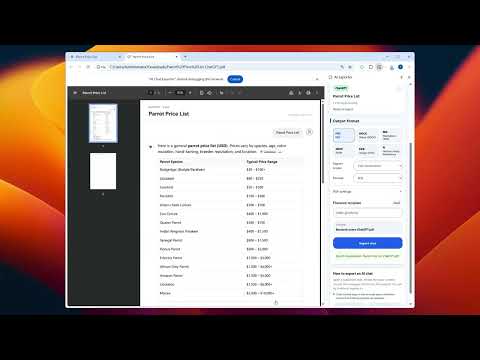
Overview
Export conversations from ChatGPT, Claude, and Gemini directly in your browser.
AI Chat Exporter helps you save a conversation while you are viewing it in ChatGPT, Claude, or Gemini. Open the side panel, choose the part of the conversation you want to keep, adjust the export settings, and download a local file for reading, sharing, or archiving. The workflow is user initiated. Conversation extraction and file generation happen in your browser. Optional sign-in is used only for account, subscription, and usage management. The extension does not request Gmail, Drive, Docs, or Notion API access. You can try the core workflow before signing in.
0 out of 5No ratings
Details
- Version2.0.9
- UpdatedAugust 18, 2026
- Size356KiB
- Languages14 languages
- DeveloperWebsite
Email
zyacheng@gmail.com - Non-traderThis developer has not identified itself as a trader. For consumers in the European Union, please note that consumer rights do not apply to contracts between you and this developer.
Privacy

AI Chat Exporter has disclosed the following information regarding the collection and usage of your data. More detailed information can be found in the developer's privacy policy.
AI Chat Exporter handles the following:
This developer declares that your data is
- Not being sold to third parties, outside of the approved use cases
- Not being used or transferred for purposes that are unrelated to the item's core functionality
- Not being used or transferred to determine creditworthiness or for lending purposes
Support
For help with questions, suggestions, or problems, visit the developer's support site