

EasyAgent: Browser Macro Recorder & Form Filler

Overview
Browser macro recorder & form filler. Record clicks and typing once, replay them for every row of your Excel or CSV data. Free.
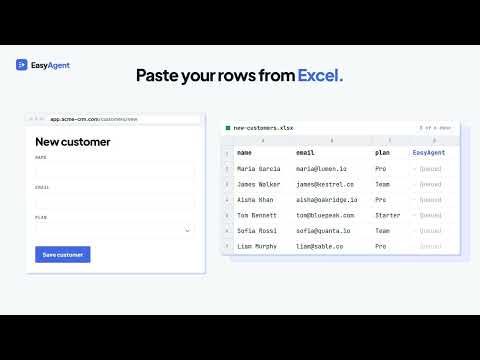
EasyAgent is a browser macro recorder and form filler. Record a task once, paste your rows from Excel, and it repeats the task for every row: data entry, bulk updates and web scraping, with no code. Free, no account, and everything stays in your browser. HOW IT WORKS 1. Record the task once Press Start new recording and use the website as normal. Clicks, typing, checkboxes, dropdowns and page changes are saved as steps in plain English, like "Type into email" or "Click Save". 2. Paste your spreadsheet Copy rows from Excel, Google Sheets or a CSV file and paste them in, or drop in an .xlsx, .xls or .csv file. The Batch Builder opens in a full browser tab: click a recorded field, then the column it comes from, and check a preview of every row before you send it. Fields you don't link keep their recorded value on every row. Your rows then show as a table you can edit: fix a typo, add or delete a row. 3. Test, then run every row Dry run tries the first row. If it works, Run remaining carries on from row 2, so nothing is entered twice. Start at any row, add a pause between rows, and watch each step tick off on a live timeline. Pause any time, or stop. 4. Check the results Each row in the table shows its result. Every run also gives you a results sheet: your rows with a Done or Failed status, the reason for any failure, and any data you captured. Copy it straight into Excel or download it as a CSV. BUILT FOR BIG BATCHES • You decide what happens when a row fails: pause and ask you, skip it and carry on, or stop the batch. • Retry failed rows: re-run only the rows that failed. Rows that failed after the Save click are marked Check by hand instead, so nothing is created twice. • Reliable dropdowns: picks the option whose text matches your sheet exactly, and stops that row with a clear error listing the options it does offer if there isn't one. • Resume after a stop or crash: progress is saved after every row. • Step through: pause before every step, with the field outlined on the page, to find where a macro goes wrong. • Speed control: Fast for quick sites, Slow or Very slow for sites that lag. • Optional fields: record a form once with every option ticked. A checkbox and the fields it reveals run only on rows that fill them in, so one macro covers every variation. • Built-in values: {{today}}, {{today+7}}, {{now}}, {{row}} and {{random}} fill in dates, row numbers and unique codes, in the date format you choose. • Retry a flaky step, or stop a row when a key step fails. EXTRACT DATA FROM WEBSITES Add an Extract step to capture a value, or Extract table to capture every row of a table or list. Results download as CSV for Excel. Add Screenshot steps to save a picture of the page, or Fetch URL to read a value straight from an API. RUN ON A SCHEDULE Run any saved macro every 15 minutes up to once a day, from a start time you choose. Every run is written to a log you can download. SAVE AND SHARE MACROS Keep as many macros as you like, sorted into groups. Share one as a small file, and a teammate imports it in one click. WHAT PEOPLE AUTOMATE • Filling web forms from Excel or a spreadsheet • Bulk data entry into admin panels, CMS and CRM systems • Adding or updating products, prices, stock and customer records • Setting up batches of users or accounts • Testing a form with many different values • Downloading reports on a schedule • Copying tables and data out of web pages • Taking screenshots of a page over time • Any website without an API or bulk import PRIVATE BY DESIGN • Runs entirely in your browser, using the sites you're already signed in to • No account, no sign-up • No ads and no tracking: nothing is sent to us • No AI: it replays exactly the steps you recorded, every time • Password values are never recorded • Your macros and spreadsheets stay on your computer Opens in Chrome's side panel, so it stays next to the page while you work. Free. No account required. Help and guides: https://www.portal-fox.com/easy-agent/help.html
0 out of 5No ratings
Details
- Version1.5.0
- UpdatedOctober 19, 2026
- Offered byPortal-Fox
- Size246KiB
- LanguagesEnglish (United Kingdom)
- Developer
Email
bob@portal-fox.com - Non-traderThis developer has not identified itself as a trader. For consumers in the European Union, please note that consumer rights do not apply to contracts between you and this developer.
Privacy

This developer declares that your data is
- Not being sold to third parties, outside of the approved use cases
- Not being used or transferred for purposes that are unrelated to the item's core functionality
- Not being used or transferred to determine creditworthiness or for lending purposes