“Easy Screenshot - a Web Clipper”的产品徽标图片

Easy Screenshot - a Web Clipper

精选
4.2(

74 个评分

)
Easy Screenshot - a Web Clipper的项目媒体 2(屏幕截图)
Easy Screenshot - a Web Clipper的项目媒体 3(屏幕截图)
产品视频缩略图
Easy Screenshot - a Web Clipper的项目媒体 2(屏幕截图)
Easy Screenshot - a Web Clipper的项目媒体 3(屏幕截图)
产品视频缩略图
Easy Screenshot - a Web Clipper的项目媒体 2(屏幕截图)
产品视频缩略图
Easy Screenshot - a Web Clipper的项目媒体 2(屏幕截图)
Easy Screenshot - a Web Clipper的项目媒体 3(屏幕截图)

概述

视觉部分、整个页面或具有自动滚动和编辑支持的选择性区域的全功能捕捉工具。

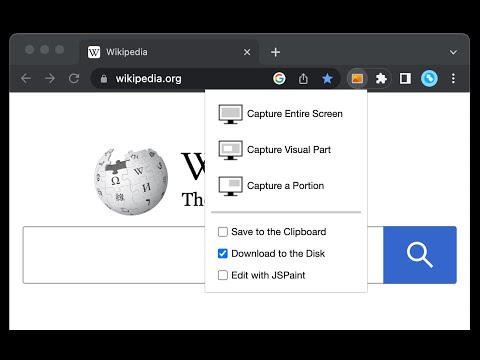
This is a simple yet powerful tool to take screenshots from the active tab with just two clicks. You can take a screenshot from a portion of the page, the visual viewport, or even the entire page even if the page has vertical and horizontal scroll bars, and save the resulted image into the default download directory or save it to the clipboard. This extension adds a toolbar button to the browser action area. Clicking on this button opens a popup window that contains three options. "Capture Entire Screen", "Capture Visual Part", and "Capture a Portion". These items are also added to the right-click context menu of the page for easy access. Note that if the page size is bigger than your window size and the "Capture Entire Screen" option is selected, the extension needs to scroll the entire page to capture different parts and merge these parts to generate a single image from the entire page. Also, note that the resolution of the taken image depends on the screen resolution. For instance, if you have a 4K display (like Retina displays), the image resolution is at least four times better than a normal display. To have a compatible image, this extension stores all the captured screenshots in PNG format. This format is best supported by various devices.

4.2 星(5 星制)74 个评分

详细了解结果和评价。

详情

  • 版本
    0.5.2
  • 上次更新日期
    2025年11月3日
  • 提供方
    chYer
  • 大小
    50.85KiB
  • 语言
    12 种语言
  • 开发者
    邮箱
    chyer.webstore@yahoo.com
  • 非交易者
    该开发者尚未将自己标识为交易者。欧盟地区消费者须知:消费者权利可能不适用于您与该开发者达成的合约。

隐私权

管理扩展程序并了解它们在组织中的使用情况
该开发者已披露,此产品不会收集或使用您的数据。

该开发者已声明,您的数据:

  • 不会因未获批准的用途出售给第三方
  • 不会为实现与产品核心功能无关的目的而使用或转移
  • 不会为确定信用度或放贷目的而使用或转移

支持

若有任何疑问、建议或问题,请访问开发者的支持网站

相关

Shot Crop - Screen Capture & Editor

3.4

Capture parts of a page or entire sites and then edit and share your image!

Web Clipper (Nimbus)

3.4

Web Clipper that works! The easiest way to clip text, pics, links, email and pdf from internet pages and save them.

EdShot

4.1

Screenshots, Cropped shots, Snap-shots, Videos and Screencasts taken with a single click.

Screenshot

4.5

Quickly take screenshot of current tab. Keyboard Command: Alt+P.

Handy Screenshot - 全页面截图

4.8

轻松截取网页截图。截取、编辑、注释并以 PNG / JPG / WEBP 格式保存。

网页截图 - Screenshot Extension

4.7

方便快捷地截取整个网页,并保存为图像。这是第一个可以截取整个页面的扩展。

Screshot - One click screen capture and editor

4.1

Capture and edit your screen in one click. Fast, simple, and built for productivity.

StaticShot - Screenshot to Notes & Images

4.7

Capture, annotate, and save screenshots as markdown notes or images on Static.md

Screenshot Tool - 截屏和屏幕视频录制器

4.7

免费易用的屏幕录像机和屏幕截图工具。 截屏或录屏,编辑,下载和分享

Screenshot Capture

4.1

Capture viewport, crop & save to file, copy to clipboard as binary or data URL

Fast Screenshot

3.8

Take a screenshot

Page Screenshot

3.9

Take a screenshot from the entire website with just one click!

Shot Crop - Screen Capture & Editor

3.4

Capture parts of a page or entire sites and then edit and share your image!

Web Clipper (Nimbus)

3.4

Web Clipper that works! The easiest way to clip text, pics, links, email and pdf from internet pages and save them.

EdShot

4.1

Screenshots, Cropped shots, Snap-shots, Videos and Screencasts taken with a single click.

Screenshot

4.5

Quickly take screenshot of current tab. Keyboard Command: Alt+P.

Handy Screenshot - 全页面截图

4.8

轻松截取网页截图。截取、编辑、注释并以 PNG / JPG / WEBP 格式保存。

网页截图 - Screenshot Extension

4.7

方便快捷地截取整个网页,并保存为图像。这是第一个可以截取整个页面的扩展。

Screshot - One click screen capture and editor

4.1

Capture and edit your screen in one click. Fast, simple, and built for productivity.

StaticShot - Screenshot to Notes & Images

4.7

Capture, annotate, and save screenshots as markdown notes or images on Static.md

Google 应用