


Overzicht
All-in-een capture-tool: pagina, gebied of visueel, met auto-scrollen en bewerking.
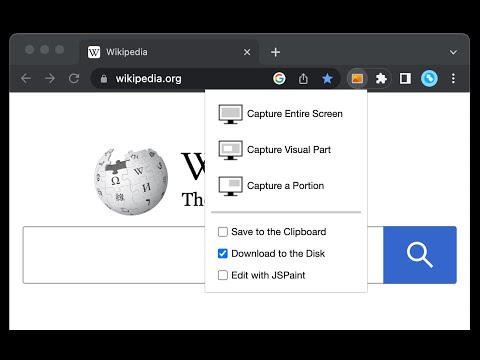
This is a simple yet powerful tool to take screenshots from the active tab with just two clicks. You can take a screenshot from a portion of the page, the visual viewport, or even the entire page even if the page has vertical and horizontal scroll bars, and save the resulted image into the default download directory or save it to the clipboard. This extension adds a toolbar button to the browser action area. Clicking on this button opens a popup window that contains three options. "Capture Entire Screen", "Capture Visual Part", and "Capture a Portion". These items are also added to the right-click context menu of the page for easy access. Note that if the page size is bigger than your window size and the "Capture Entire Screen" option is selected, the extension needs to scroll the entire page to capture different parts and merge these parts to generate a single image from the entire page. Also, note that the resolution of the taken image depends on the screen resolution. For instance, if you have a 4K display (like Retina displays), the image resolution is at least four times better than a normal display. To have a compatible image, this extension stores all the captured screenshots in PNG format. This format is best supported by various devices.
4,2 van 574 beoordelingen
Details
- Versie0.5.2
- Geüpdatet3 november 2025
- Aangeboden doorchYer
- Grootte50.85KiB
- Talen12 talen
- Ontwikkelaar
E-mail
chyer.webstore@yahoo.com - Geen handelaarDeze ontwikkelaar heeft zichzelf niet geïdentificeerd als handelaar. Voor consumenten in de Europese Unie geldt dat consumentenrechten niet van toepassing zijn op contracten tussen jou en deze ontwikkelaar.
Privacy

Deze ontwikkelaar verklaart dat je gegevens:
- Niet worden verkocht aan derden, behalve voor de goedgekeurde toepassingen
- Niet worden gebruikt of overgedragen voor doeleinden die niet zijn gerelateerd aan de kernfunctionaliteit van het item
- Niet worden gebruikt of overgedragen om de kredietwaardigheid te bepalen of voor doeleinden met betrekking tot leningen
Support
Ga naar de supportsite van de ontwikkelaar voor hulp bij vragen, suggesties of problemen