


Panoramica
Strumento di cattura tuttouno: pagina, area o visivo, con scorrimento auto e modifica.
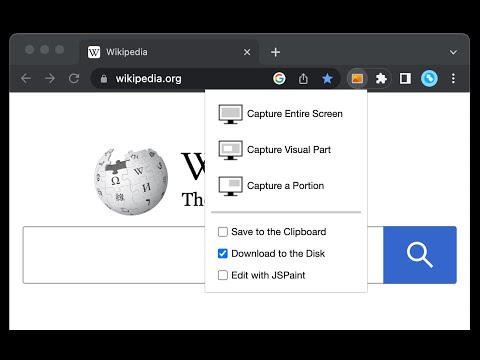
This is a simple yet powerful tool to take screenshots from the active tab with just two clicks. You can take a screenshot from a portion of the page, the visual viewport, or even the entire page even if the page has vertical and horizontal scroll bars, and save the resulted image into the default download directory or save it to the clipboard. This extension adds a toolbar button to the browser action area. Clicking on this button opens a popup window that contains three options. "Capture Entire Screen", "Capture Visual Part", and "Capture a Portion". These items are also added to the right-click context menu of the page for easy access. Note that if the page size is bigger than your window size and the "Capture Entire Screen" option is selected, the extension needs to scroll the entire page to capture different parts and merge these parts to generate a single image from the entire page. Also, note that the resolution of the taken image depends on the screen resolution. For instance, if you have a 4K display (like Retina displays), the image resolution is at least four times better than a normal display. To have a compatible image, this extension stores all the captured screenshots in PNG format. This format is best supported by various devices.
4,2 su 574 valutazioni
Dettagli
- Versione0.5.2
- Ultimo aggiornamento:3 novembre 2025
- Elemento offerto dachYer
- Dimensioni50.85KiB
- Lingue12 lingue
- Sviluppatore
Email
chyer.webstore@yahoo.com - Non commercianteQuesto sviluppatore non si è identificato come commerciante. Per quanto riguarda i consumatori nell'Unione Europea, tieni presente che i diritti del consumatore non sono applicabili ai contratti stipulati tra te e questo sviluppatore.
Privacy

Questo sviluppatore dichiara che i tuoi dati:
- Non vengono venduti a terze parti, se non per i casi d'uso approvati.
- Non vengono usati o trasferiti per finalità non correlate alle funzionalità principali dell'elemento.
- Non vengono usati o trasferiti per stabilire l'affidabilità creditizia o per finalità di prestito.
Assistenza
Per ricevere assistenza in merito a domande, suggerimenti o problemi, visita il sito di assistenza dello sviluppatore