Image du logo de l'article pour Easy Screenshot - a Web Clipper

Easy Screenshot - a Web Clipper

Sélection
4,2(

74 avis

)
Élément multimédia 2 (capture d'écran) pour Easy Screenshot - a Web Clipper
Élément multimédia 3 (capture d'écran) pour Easy Screenshot - a Web Clipper
Miniature de la vidéo de l'article
Élément multimédia 2 (capture d'écran) pour Easy Screenshot - a Web Clipper
Élément multimédia 3 (capture d'écran) pour Easy Screenshot - a Web Clipper
Miniature de la vidéo de l'article
Élément multimédia 2 (capture d'écran) pour Easy Screenshot - a Web Clipper
Miniature de la vidéo de l'article
Élément multimédia 2 (capture d'écran) pour Easy Screenshot - a Web Clipper
Élément multimédia 3 (capture d'écran) pour Easy Screenshot - a Web Clipper

Présentation

Outil de capture tout-en-un : page, zone ou visuel, avec défilement auto et édition.

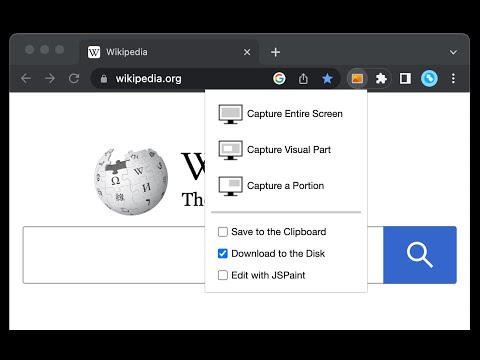
This is a simple yet powerful tool to take screenshots from the active tab with just two clicks. You can take a screenshot from a portion of the page, the visual viewport, or even the entire page even if the page has vertical and horizontal scroll bars, and save the resulted image into the default download directory or save it to the clipboard. This extension adds a toolbar button to the browser action area. Clicking on this button opens a popup window that contains three options. "Capture Entire Screen", "Capture Visual Part", and "Capture a Portion". These items are also added to the right-click context menu of the page for easy access. Note that if the page size is bigger than your window size and the "Capture Entire Screen" option is selected, the extension needs to scroll the entire page to capture different parts and merge these parts to generate a single image from the entire page. Also, note that the resolution of the taken image depends on the screen resolution. For instance, if you have a 4K display (like Retina displays), the image resolution is at least four times better than a normal display. To have a compatible image, this extension stores all the captured screenshots in PNG format. This format is best supported by various devices.

Détails

  • Version
    0.5.2
  • Dernière mise à jour
    3 novembre 2025
  • Proposé par
    chYer
  • Taille
    50.85KiB
  • Langues
    12 langues
  • Développeur
    E-mail
    chyer.webstore@yahoo.com
  • Non-professionnel
    Ce développeur ne s'est pas identifié comme professionnel. Pour les consommateurs de l'Union européenne, veuillez noter qu'il est possible que les droits des consommateurs ne s'appliquent pas aux contrats entre vous et ce développeur.

Confidentialité

Gérez les extensions et découvrez comment elles sont utilisées dans votre organisation
Le développeur a indiqué qu'il ne collecterait et n'utiliserait pas vos données.

Ce développeur déclare que vos données :

  • Ne seront pas vendues à des tiers en dehors des cas d'utilisation approuvés.
  • Ne seront ni utilisées ni transférées à des fins sans rapport avec la fonctionnalité de base de l'article.
  • Ne seront ni utilisées ni transférées pour déterminer votre solvabilité ou en vue de vous proposer un prêt.

Assistance

Pour obtenir de l'aide concernant des questions, des suggestions ou des problèmes, consultez le site d'assistance du développeur.

Articles similaires

Shot Crop - Screen Capture & Editor

3,4

Capture parts of a page or entire sites and then edit and share your image!

Web Clipper (Nimbus)

3,4

Web Clipper that works! The easiest way to clip text, pics, links, email and pdf from internet pages and save them.

EdShot

4,1

Screenshots, Cropped shots, Snap-shots, Videos and Screencasts taken with a single click.

Screenshot

4,5

Quickly take screenshot of current tab. Keyboard Command: Alt+P.

Handy Screenshot - Capture d'Écran Complète

4,8

Prenez des captures d'écran de pages web avec facilité. Capturez, éditez, annotez et sauvegardez-les aux formats PNG / JPG / WEBP.

Capture de Page Web - Screenshot Extension

4,7

Solution simple et rapide pour enregistrer des captures de n'importe quelle page web.La premier extension qui capture toute la page

Screshot - One click screen capture and editor

4,1

Capture and edit your screen in one click. Fast, simple, and built for productivity.

StaticShot - Screenshot to Notes & Images

4,7

Capture, annotate, and save screenshots as markdown notes or images on Static.md

Capture d'écran et enregistreur vidéo d'écran

4,7

Un outil de capture d'écran innovant permet aux utilisateurs de capturer et de modifier une capture d'écran. Capture d'écran pleine…

Screenshot Capture

4,1

Capture viewport, crop & save to file, copy to clipboard as binary or data URL

Fast Screenshot

3,8

Take a screenshot

Page Screenshot

3,9

Take a screenshot from the entire website with just one click!

Shot Crop - Screen Capture & Editor

3,4

Capture parts of a page or entire sites and then edit and share your image!

Web Clipper (Nimbus)

3,4

Web Clipper that works! The easiest way to clip text, pics, links, email and pdf from internet pages and save them.

EdShot

4,1

Screenshots, Cropped shots, Snap-shots, Videos and Screencasts taken with a single click.

Screenshot

4,5

Quickly take screenshot of current tab. Keyboard Command: Alt+P.

Handy Screenshot - Capture d'Écran Complète

4,8

Prenez des captures d'écran de pages web avec facilité. Capturez, éditez, annotez et sauvegardez-les aux formats PNG / JPG / WEBP.

Capture de Page Web - Screenshot Extension

4,7

Solution simple et rapide pour enregistrer des captures de n'importe quelle page web.La premier extension qui capture toute la page

Screshot - One click screen capture and editor

4,1

Capture and edit your screen in one click. Fast, simple, and built for productivity.

StaticShot - Screenshot to Notes & Images

4,7

Capture, annotate, and save screenshots as markdown notes or images on Static.md

Applications Google