


Übersicht
Tool zur Erfassung des sichtbaren Bereichs, der gesamten Seite oder eines Abschnitts mit Auto-Scroll und Bearbeitungsfunktion.
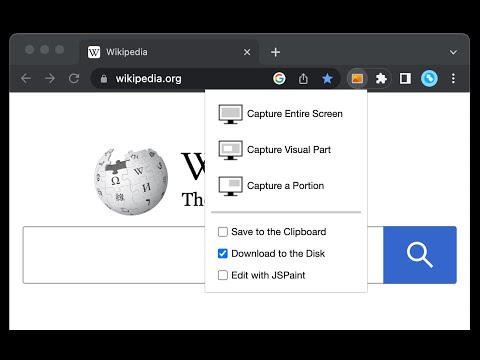
This is a simple yet powerful tool to take screenshots from the active tab with just two clicks. You can take a screenshot from a portion of the page, the visual viewport, or even the entire page even if the page has vertical and horizontal scroll bars, and save the resulted image into the default download directory or save it to the clipboard. This extension adds a toolbar button to the browser action area. Clicking on this button opens a popup window that contains three options. "Capture Entire Screen", "Capture Visual Part", and "Capture a Portion". These items are also added to the right-click context menu of the page for easy access. Note that if the page size is bigger than your window size and the "Capture Entire Screen" option is selected, the extension needs to scroll the entire page to capture different parts and merge these parts to generate a single image from the entire page. Also, note that the resolution of the taken image depends on the screen resolution. For instance, if you have a 4K display (like Retina displays), the image resolution is at least four times better than a normal display. To have a compatible image, this extension stores all the captured screenshots in PNG format. This format is best supported by various devices.
4,2 von 574 Bewertungen
Details
- Version0.5.2
- Aktualisiert3. November 2025
- Angeboten vonchYer
- Größe50.85KiB
- Sprachen12 Sprachen
- Entwickler
E-Mail
chyer.webstore@yahoo.com - Kein HändlerDieser Entwickler hat sich nicht als Händler deklariert. Für Verbraucher in der Europäischen Union gelten die Verbraucherrechte nicht für Verträge, die zwischen dir und diesem Entwickler geschlossen werden.
Datenschutz

Dieser Entwickler erklärt, dass deine Daten
- nicht an Dritte verkauft werden, außer in den genehmigten Anwendungsfällen
- nicht für Zwecke genutzt oder übertragen werden, die nichts mit der Hauptfunktionalität des Artikels zu tun haben
- nicht zur Ermittlung der Kreditwürdigkeit oder für Darlehenszwecke verwendet oder übertragen werden
Support
Wenn du Probleme, Fragen oder Vorschläge hast, rufe die Supportwebsite des Entwicklers auf