

Easy Reply: One-Click Reply Buttons & Polls for Gmail

Overview
Add one-click reply buttons and polls to Gmail. Recipients tap an answer, no typing, so cold emails and follow-ups get replies.
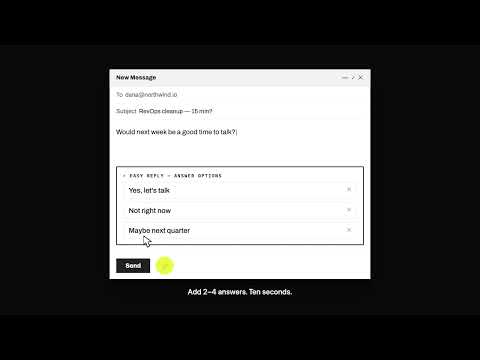
Get answers, not silence. Easy Reply adds one-click reply buttons to any Gmail email. Your recipient taps the answer that is already true (Yes, No, Next week) and you get it in your thread. No typing, no login, nothing for them to install. Use it for: - Cold email and sales follow-ups ("Worth a chat? Yes / Not now / Wrong person") - Quick yes/no votes and email polls with your team - Client approvals and RSVPs - Following up on an email with no response Why it works: replying takes effort, tapping doesn't. A fast no beats six weeks of chasing. How it works: 1. Install on desktop Chrome. 2. Approve Google sign-in. 3. In compose, click the lightning bolt and add 2-4 answers, or let AI suggest them. 4. Send. Answers arrive as notifications in your original thread. Plans: Free, 50 sends a month. Pro, $19/month for unlimited sends. Privacy: Easy Reply sends mail on your behalf and sees your name and address. It does not read your inbox. https://easyreply.ai/privacy
5 out of 54 ratings
Details
- Version1.98
- UpdatedOctober 30, 2026
- FeaturesOffers in-app purchases
- Size753KiB
- LanguagesEnglish
- Developer
- Non-traderThis developer has not identified itself as a trader. For consumers in the European Union, please note that consumer rights do not apply to contracts between you and this developer.
Privacy

Easy Reply: One-Click Reply Buttons & Polls for Gmail has disclosed the following information regarding the collection and usage of your data. More detailed information can be found in the developer's privacy policy.
Easy Reply: One-Click Reply Buttons & Polls for Gmail handles the following:
This developer declares that your data is
- Not being sold to third parties, outside of the approved use cases
- Not being used or transferred for purposes that are unrelated to the item's core functionality
- Not being used or transferred to determine creditworthiness or for lending purposes
Support
For help with questions, suggestions, or problems, visit the developer's support site