Item logo image for Easy Reply: One-Click Reply Buttons & Polls for Gmail

Easy Reply: One-Click Reply Buttons & Polls for Gmail

https://www.easyreply.ai/
5.0(

4 ratings

)
Item media 6 (screenshot) for Easy Reply: One-Click Reply Buttons & Polls for Gmail
Item video thumbnail
Item media 2 (screenshot) for Easy Reply: One-Click Reply Buttons & Polls for Gmail
Item media 3 (screenshot) for Easy Reply: One-Click Reply Buttons & Polls for Gmail
Item media 4 (screenshot) for Easy Reply: One-Click Reply Buttons & Polls for Gmail
Item media 5 (screenshot) for Easy Reply: One-Click Reply Buttons & Polls for Gmail
Item media 6 (screenshot) for Easy Reply: One-Click Reply Buttons & Polls for Gmail

Overview

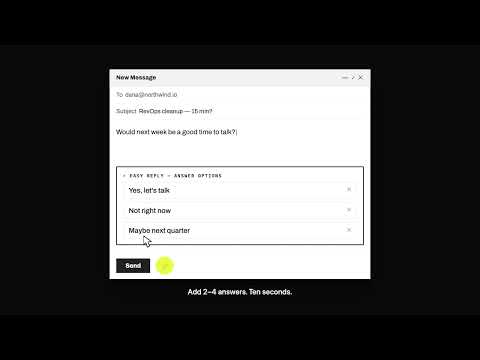
Add one-click reply buttons and polls to Gmail. Recipients tap an answer, no typing, so cold emails and follow-ups get replies.

Get answers, not silence. Easy Reply adds one-click reply buttons to any Gmail email. Your recipient taps the answer that is already true (Yes, No, Next week) and you get it in your thread. No typing, no login, nothing for them to install. Use it for: - Cold email and sales follow-ups ("Worth a chat? Yes / Not now / Wrong person") - Quick yes/no votes and email polls with your team - Client approvals and RSVPs - Following up on an email with no response Why it works: replying takes effort, tapping doesn't. A fast no beats six weeks of chasing. How it works: 1. Install on desktop Chrome. 2. Approve Google sign-in. 3. In compose, click the lightning bolt and add 2-4 answers, or let AI suggest them. 4. Send. Answers arrive as notifications in your original thread. Plans: Free, 50 sends a month. Pro, $19/month for unlimited sends. Privacy: Easy Reply sends mail on your behalf and sees your name and address. It does not read your inbox. https://easyreply.ai/privacy

Details

  • Version
    1.101
  • Updated
    November 11, 2026
  • Features
    Offers in-app purchases
  • Size
    758KiB
  • Languages
    English
  • Developer
    Philip McNamara
    120 Hebard St Santa Cruz, CA 95060 US
    Website
    Email
    phil@easyreply.email
  • Non-trader
    This developer has not identified itself as a trader. For consumers in the European Union, please note that consumer rights do not apply to contracts between you and this developer.

Privacy

Manage extensions and learn how they're being used in your organization

Easy Reply: One-Click Reply Buttons & Polls for Gmail has disclosed the following information regarding the collection and usage of your data. More detailed information can be found in the developer's privacy policy.

Easy Reply: One-Click Reply Buttons & Polls for Gmail handles the following:

Personally identifiable information
Personal communications
Website content

This developer declares that your data is

  • Not being sold to third parties, outside of the approved use cases
  • Not being used or transferred for purposes that are unrelated to the item's core functionality
  • Not being used or transferred to determine creditworthiness or for lending purposes

Support

For help with questions, suggestions, or problems, visit the developer's support site

You might also like…

Free Unlimited Email Tracker for Gmail, No Signature | TrackMailBox

4.6

Free unlimited email tracker for Gmail. Real-time open & click tracking. No signatures, no branding, no limits. Free forever.

Mixmax: Email Tracking, Follow-Ups and Meeting Scheduling for Gmail

4.8

Follow up and follow through from Gmail. Send follow-ups that stop on reply, see who opened, book meetings in one click. Free plan.

Gmail Notifications

4.8

Gmail Notifications: Simple notifier for gmail. Check gmail inbox and get instant alerts in any tab—no switching.

Soft Send: Delay & Undo Send for Gmail

4.7

Delay Gmail messages, including replies. Cancel, pause or send now, and catch typos, missing attachments and risky recipients.

Search
Clear search
Close search
Google apps
Main menu