

Easy Reply – One-Click Reply Buttons for Gmail

Overview
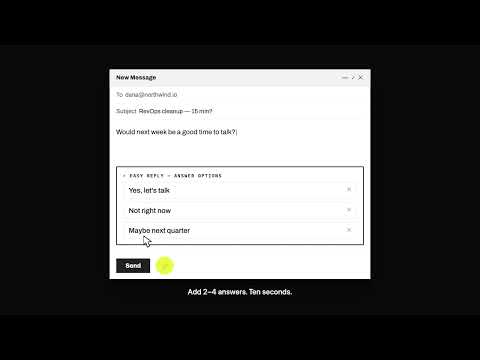
Easy Reply is a powerful and convenient Gmail extension that simplifies the process of getting others to respond to your emails.
Add 2–4 tappable reply buttons to your cold emails in Gmail. Your prospect picks the answer that is already true — no typing, no login, nothing to install on their side — and their choice arrives as a notification in your original thread. Why prospects answer Replying takes more effort than ignoring you. People who will not stop to type a sentence will still tap the answer that is already true. Always include a real "no" — a fast no is a result; silence is a loop you chase for six weeks. Setup, about three minutes 1. Install on desktop Chrome. 2. Complete the Google authorization — the modal stays over your Gmail compose window. 3. Click the lightning bolt in the compose toolbar and add 2–4 answers. 4. Send. What it is not Not a form, survey or scheduling page. The answer is filed from noreply@easyreply.email into your thread — it is not mail sent from your prospect's account. Plans Free: 10 sends a month, 3 AI answer suggestions per email, Easy Reply footer on sends. Pro: $19/month for unlimited sends. Desktop Gmail in Chrome.
5 out of 54 ratings
Details
- Version1.92
- UpdatedOctober 10, 2026
- FeaturesOffers in-app purchases
- Size742KiB
- LanguagesEnglish
- Developer
- Non-traderThis developer has not identified itself as a trader. For consumers in the European Union, please note that consumer rights do not apply to contracts between you and this developer.
Privacy

Easy Reply – One-Click Reply Buttons for Gmail has disclosed the following information regarding the collection and usage of your data. More detailed information can be found in the developer's privacy policy.
Easy Reply – One-Click Reply Buttons for Gmail handles the following:
This developer declares that your data is
- Not being sold to third parties, outside of the approved use cases
- Not being used or transferred for purposes that are unrelated to the item's core functionality
- Not being used or transferred to determine creditworthiness or for lending purposes
Support
For help with questions, suggestions, or problems, visit the developer's support site