Item logo image for Easy Organizer and Backup for Google Photos

Easy Organizer and Backup for Google Photos

5.0(

1 rating

)
ExtensionTools3 users
Item media 3 (screenshot) for Easy Organizer and Backup for Google Photos
Item media 1 (screenshot) for Easy Organizer and Backup for Google Photos
Item media 2 (screenshot) for Easy Organizer and Backup for Google Photos
Item media 3 (screenshot) for Easy Organizer and Backup for Google Photos
Item media 1 (screenshot) for Easy Organizer and Backup for Google Photos
Item media 2 (screenshot) for Easy Organizer and Backup for Google Photos
Item media 3 (screenshot) for Easy Organizer and Backup for Google Photos

Overview

Hide album photos from your Google Photos main view (they stay in albums), and back up albums to folders on your computer.

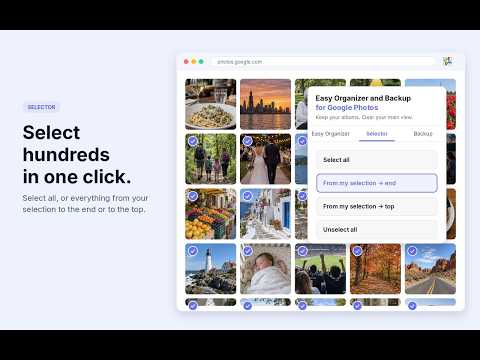
ORGANIZE AND BACK UP GOOGLE PHOTOS — WITHOUT DELETING YOUR MEMORIES Easy Organizer and Backup for Google Photos helps you clean up your Google Photos main view, restore photos anytime, select photos faster, and back up albums to real folders on your computer. It is both an organizer and a backup tool. Use it to reduce clutter in your Google Photos timeline, keep your albums intact, and create local album folders you can browse outside Google Photos. Your photos are not deleted. Your albums stay complete. Your backups are saved locally to the folder you choose. WHAT YOU CAN DO ✓ ORGANIZE YOUR GOOGLE PHOTOS MAIN VIEW Choose albums you have already organized, then hide those album photos from the main Google Photos timeline. The photos stay inside their albums, but no longer crowd the main view. This makes Google Photos feel cleaner and easier to browse — especially on your phone. ✓ BACK UP ALBUMS TO REAL FOLDERS Save selected Google Photos albums to ordinary folders on your computer. Each selected album becomes its own local folder, so you can browse your files outside Google Photos. ✓ RUN INCREMENTAL BACKUPS Run a backup again later and already-saved files are skipped. Only missing items are downloaded, which makes future backups easier to manage. (when choosing to save to the same folder) ✓ RESTORE PHOTOS ANYTIME Changed your mind? Use Restore to bring photos previously hidden from the timeline back to the main Google Photos view whenever you want. ✓ SELECT PHOTOS FASTER The Selector tool helps you manage large photo sets more easily. You can: ✓ Select all photos ✓ Select from the current photo to the end ✓ Select from the current photo to the top ✓ Unselect everything ✓ STAY IN CONTROL Large organizing or backup tasks can take a very long time. depending on the size of your collection, speed of your internet and mainly Google Photos' speed. You can pause or stop long-running tasks when needed. WHY PEOPLE USE IT ✓ To organize a crowded Google Photos timeline ✓ To reduce clutter in the main photo view ✓ To keep albums complete without deleting photos ✓ To make browsing Google Photos on a phone easier ✓ To back up Google Photos albums to local folders ✓ To keep album folders available outside Google Photos ✓ To run repeat backups without downloading everything again ✓ To restore hidden photos when needed ✓ To select large groups of photos faster ✓ To manage large photo collections with less manual work A SIMPLE EXAMPLE You create albums for holidays, family, work, receipts, screenshots, travel, or special events. But your main Google Photos view still shows everything. With Easy Organizer and Backup, you can organize the main view by keeping those photos inside their albums while hiding them from the timeline. Then, with Album Backup, you can save those albums as real folders on your computer. Your albums remain complete. Your main view becomes cleaner. Your album folders can be backed up locally. ORGANIZER The Organizer feature helps clean up your main Google Photos view. It hides selected album photos from the main timeline while keeping them inside their albums. This is useful when you have already organized photos into albums but still see the same photos everywhere in your main Google Photos feed. BACKUP The Backup feature saves selected Google Photos albums to your computer as real folders. Each album is saved as its own folder with ordinary files you can browse locally. Backups are incremental. If you run the backup again later, files that are already saved are skipped and only missing items are downloaded. Please note: backup speed depends on Google Photos, your internet connection, and the size of your albums. Large albums can take a long time, so it is best to start with a few albums first. SELECTOR The Selector tool helps when you need to select many photos in Google Photos. You can select all photos, select a range from your current photo to the end, select a range from your current photo to the top, or unselect everything. This is useful when working with large photo collections and repetitive manual selection would take too much time. PRIVACY Your photos are not uploaded to our servers. The extension is designed to work locally in your browser on Google Photos and performs the actions you request. Organizer actions happen inside Google Photos. Backup files are saved only to the folder you choose on your computer. Your photos stay in your Google account unless you choose to back them up locally. FAQ DOES THIS ORGANIZE GOOGLE PHOTOS OR BACK UP GOOGLE PHOTOS? Both. Easy Organizer and Backup is designed to help you organize your Google Photos main view and back up selected Google Photos albums to local folders on your computer. DOES THIS DELETE MY PHOTOS? No. Easy Organizer and Backup does not delete your photos. It helps hide selected album photos from the main Google Photos view while keeping them safely inside their albums. WILL MY ALBUMS STAY INTACT? Yes. Your albums stay intact. The goal is to clean up the main Google Photos timeline, not remove photos from your albums. CAN I BRING PHOTOS BACK TO THE MAIN VIEW? Yes. Use Restore to bring previously hidden photos back to the main Google Photos view anytime. DOES THIS FREE UP STORAGE ON MY PHONE? No. This extension is designed to reduce visual clutter in Google Photos, especially when browsing on your phone. It does not claim to free up device storage. DOES IT MAKE GOOGLE PHOTOS LESS CLUTTERED ON MY PHONE? Yes. After Google Photos syncs, your main view can feel much cleaner on your phone because photos which have been placed in an album are no longer crowding the main timeline. DOES BACKUP SAVE ALBUMS AS REAL FOLDERS? Yes. Album Backup saves selected Google Photos albums as ordinary folders on your computer, with one folder per album. ARE BACKUPS INCREMENTAL? Yes. When you run a backup again, files that are already saved are skipped and only missing items are downloaded (provided you choose the same backup location). WILL A PHOTO IN MULTIPLE ALBUMS BE BACKED UP MORE THAN ONCE? Yes. If the same photo belongs to multiple selected albums, it will be saved inside each album’s folder. This keeps each album folder complete. (What Google Photos calls an album is actually a 'tag', and not a real album, and so one photo could be in several albums) ARE ORIGINAL FILES AND METADATA GUARANTEED? No. The backup feature downloads the media available through Google Photos in the browser. Original quality, metadata, EXIF data, and video behavior depends on Google Photos. DOES THE EXTENSION UPLOAD MY PHOTOS SOMEWHERE? No. The extension is designed to work locally in your browser. Your photos are not uploaded to our servers. WHERE ARE BACKUP FILES SAVED? Backup files are saved only to the folder you choose on your computer. IS THIS EXTENSION MADE BY GOOGLE? No. This extension is not affiliated with, endorsed by, or sponsored by Google. Google Photos is a trademark of Google LLC.

Details

  • Version
    1.111.0
  • Updated
    June 11, 2026
  • Offered by
    flya1.com
  • Size
    137KiB
  • Languages
    English (United States)
  • Developer
    Email
    flya1.com@gmail.com
  • Non-trader
    This developer has not identified itself as a trader. For consumers in the European Union, please note that consumer rights do not apply to contracts between you and this developer.

Privacy

Manage extensions and learn how they're being used in your organization

Easy Organizer and Backup for Google Photos has disclosed the following information regarding the collection and usage of your data. More detailed information can be found in the developer's privacy policy.

Easy Organizer and Backup for Google Photos handles the following:

Website content

This developer declares that your data is

  • Not being sold to third parties, outside of the approved use cases
  • Not being used or transferred for purposes that are unrelated to the item's core functionality
  • Not being used or transferred to determine creditworthiness or for lending purposes

Support

For help with questions, suggestions, or problems, visit the developer's support site

Google apps