

Easy Grouping for Google Calendar

Общ преглед
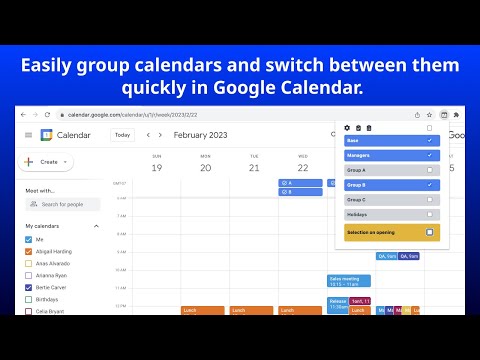
Easily group calendars and switch between them quickly in Google Calendar. Groups can be defined for project teams, departments,…
Easily group calendars and switch between them quickly in Google Calendar. Groups can be defined for project teams, departments, or managers, depending on your use case. To create a group, simply enter the name of the group and the name of the target calendar from "My Calendars” and “Other Calendars" in the text area. You can easily combine, select and switch between calendars from a list of calendars you have defined. Key Features * You can easily define groups of calendars to which you are subscribed and switch between calendar groups. * Settings can also be imported and exported as JSON files. Privacy * This extension does not send or store any information to external services. Recent Updates * 2025-12-13: Fixed calendar selection issue when browser window is not fullscreen or zoomed in. Added virtual scrolling support to properly detect calendar elements that are lazily rendered. * 2025-12-01: Fixed compatibility with Google Calendar UI update. Changed calendar container detection to find lists containing checkboxes, ensuring reliable detection regardless of UI structure changes.
4,2 от 512 оценки
Подробности
- Версия1.9.1
- Актуализирано16 декември 2025 г.
- Размер113KiB
- ЕзициEnglish
- ПрограмистУебсайт
По имейл
support@findgrep.app - НетърговецТози програмист не се е идентифицирал като търговец. Имайте предвид, че правата на потребителите не са приложими за договори, сключени между потребители в Европейския съюз и този програмист.
Поверителност
Този програмист декларира, че данните ви:
- Не се продават на трети страни за цели извън одобрените случаи на употреба
- Не се използват или прехвърлят за цели, които не са свързани с основната функционалност на елемента
- Не се използват или прехвърлят с цел оценка на кредитоспособността или с цел кредитиране
Поддръжка
За помощ относно въпроси, предложения или проблеми, моля, отворете тази страница на настолния си браузър