

EaseReader

Overview
Read long articles without distractions. Blur the clutter, focus one paragraph, and keep your place. No account, no AI.
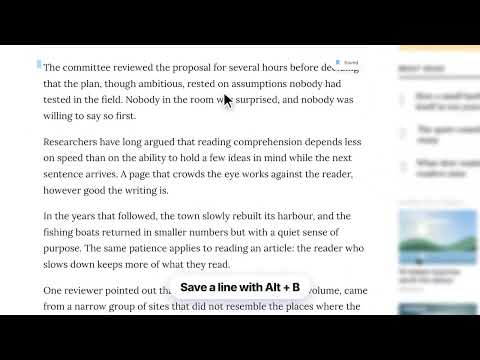
EaseReader makes long articles easier to read. Click the icon on any page and it blurs the clutter around the text, so you can focus on what you came to read. WHAT IT DOES • Blur distractions: ads, sidebars, menus and comments fade out of the way. • Focus one paragraph: only the paragraph you are reading stays sharp. Use the ↑ and ↓ keys to move to the next or previous one. • Break into chunks: long paragraphs are read a few lines at a time, with the ← and → keys. • Adjustable blur strength to suit your eyes. • Highlight: select any text and save it in four colors. Your highlights come back when you return to the page. • Bionic reading: bolds the start of each word to guide your eyes along the line. • Dyslexia-friendly font: swap the page font for one that is easier to read. • Read aloud: have the text read to you, using your browser's built-in voices. • Bookmarks: save your place on any page and jump back to it later. PRIVATE BY DESIGN • No account, no sign-up, no AI. • Your settings, highlights and bookmarks stay in your browser. • EaseReader never sends your reading or browsing data anywhere. AVAILABLE IN YOUR LANGUAGE English, Español, Français, Deutsch, Português (Brasil), Русский, 简体中文, 日本語, हिन्दी, বাংলা KEYBOARD SHORTCUTS • Alt+Shift+E: turn EaseReader on or off (you can change this at chrome://extensions/shortcuts) • ↑ / ↓: previous or next paragraph • Alt+B: save your place • Alt+R: read aloud • Esc: close NOTE EaseReader does not work on PDF files or on Chrome's own pages (chrome://).
0 out of 5No ratings
Details
- Version1.0.0
- UpdatedNovember 14, 2026
- Offered byEaseReader
- Size182KiB
- Languages10 languages
- Developer
Email
hi.ease.reader@gmail.com - Non-traderThis developer has not identified itself as a trader. For consumers in the European Union, please note that consumer rights do not apply to contracts between you and this developer.
Privacy

This developer declares that your data is
- Not being sold to third parties, outside of the approved use cases
- Not being used or transferred for purposes that are unrelated to the item's core functionality
- Not being used or transferred to determine creditworthiness or for lending purposes