

Ears: Bass Boost, EQ Any Audio!
3,7K valutazioni
)
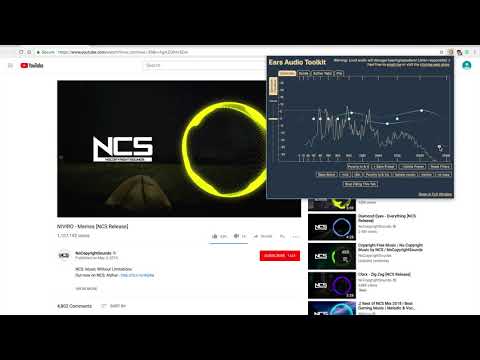
Panoramica
EQ any audio you find on the web, live! Crank the bass, dim the highs, up the vocals: all with Ears!
Ears Audio Toolkit is a volume booster and graphic equalizer. With Ears, you can alter the EQ of any and all tabs at the same time! Just navigate to any website with audio, open Ears, then drag the dots to raise or lower the filters. Ears works with ANY audio on ANY website :) Your current tab will be EQed by default when opening the extension. You can now SEE the audio and your changes in real-time using the Spectrum Visualizer! UPDATE 1.3.12: Buy me a coffee to show your appreciation for Ears UPDATE 1.3.11: Removed Ears Pro (Google disabled paid extensions). Everyone now has all Ears Pro features for free. Added link to a survey, fill it out to influence new features! UPDATE 1.3.10: Fix for computers with increased font size. UPDATE 1.3.0: Introducing Ears Pro! UPDATE 1.2.16: Fix scrolling on Windows. UPDATE 1.2.12: UI improvements. UPDATE 1.2.8: Fixed choppy / pitch-shifted audio caused when the system's sample rate changed. Added some latency improvements. UPDATE 1.2.7: Added fullscreen and normal-screen bug fixes. Please report any additional fullscreen-related problems. UPDATE 1.2.1: Drag the middle line for a volume slider. Be careful, it is powerful! Save and delete named presets! Adjust filter Q parameter by holding shift and dragging up and down on the dot. Performance optimizations. Use the left- and right-most filters (controlled with the dots) to affect all of the lows or all of the highs. Then tweak the middle frequencies with the inner filters. If the music clips, try sliding the volume line down. Ears works with any website! Enjoy! Upcoming Features: Per-tab stereo panning Auto-EQ specific sites Developed by Kevin King Acknowledgements: Biquad/Shelf filter equations: Nigel Redmon at earlevel.com
4,5 su 53,7K valutazioni
Dettagli
- Versione1.3.12
- Ultimo aggiornamento:23 aprile 2023
- Elemento offerto daVaux Audio
- Dimensioni224KiB
- LingueEnglish
- Sviluppatore
Email
4kevinking@gmail.com - Non commercianteQuesto sviluppatore non si è identificato come commerciante. Per quanto riguarda i consumatori nell'Unione Europea, tieni presente che i diritti del consumatore non sono applicabili ai contratti stipulati tra te e questo sviluppatore.
Privacy

Questo sviluppatore dichiara che i tuoi dati:
- Non vengono venduti a terze parti, se non per i casi d'uso approvati.
- Non vengono usati o trasferiti per finalità non correlate alle funzionalità principali dell'elemento.
- Non vengono usati o trasferiti per stabilire l'affidabilità creditizia o per finalità di prestito.
Assistenza
Per ricevere assistenza in merito a domande, suggerimenti o problemi, apri questa pagina nel browser desktop