


개요
Manga Reader
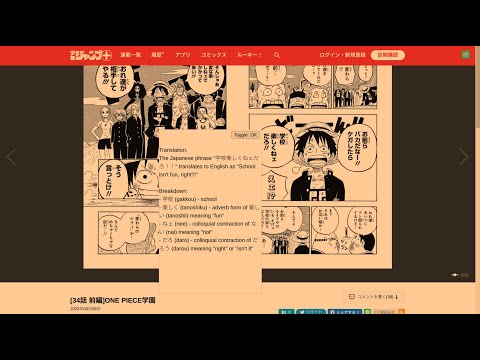
Join the discord at http://discord.veebee.fun to get updates on server status and new features or submit feedback and requests. Support me at https://www.patreon.com/MangaReader276 **What Does this Extension Offer?** This extension offers a unique approach to manga/manhwa/manhua translation and Japanese/Korean/Chinese learning: 1. **Side-by-side translation**: Unlike existing manga translation tools that simply replace Japanese text with English, this extension allows you to see the original Japanese text alongside the translated text. This feature provides a learning opportunity by enabling you to compare and understand the language in its original form. First click on the extension icon or use a keyboard shortcut to initiate cropping. Then crop the text bubble or the phrase to be translated. Feel free to toggle to see the original text to ensure that OCR (Optical Character Recognition) identifies the correct text to be translated. 2. **AI-powered Tutor**: While the extension offers conventional translation, it also provides the option to harness the power of a large language model. This cutting-edge feature breaks down sentences or phrases into easily digestible words or compound words, along with their translations. This approach enables a deeper understanding of the context and nuances within the text. 3. **Not just manga**: You can use this for manhwa and manhua as well since Korean and Chinese are also supported! You can also use this on other platforms like Youtube or Netflix subtitles! **Try it out yourself** 0. Pin the extension 1. Go to https://shonenjumpplus.com/episode/4856001361458138514 2. Right click the extension icon to open the options page from the menu 3. Sign in with google account 4. Feel free to change the other options 5. Go back to the manga 6. Click on the extension icon to start cropping. 7. Crop any text bubbles 8. (optional) switch between gpt/deepl on the options page. Choose the former if you want in depth translation. Choose the latter if you want a quicker translation 9. (optional) choose different capture modes that best suit your reading needs. Single is the most reliable at the moment. Multiple works best on large manga panels or an entire page. 10. (optional) switch between the supported languages on the options page. 11. (optional) enter you own GPT key for faster translations. The key is local to your browser and will not be uploaded to any servers. (This can be publicly verified in the client code.) **Important note** This is an early prototype. Depending on how many users find this idea useful, I will work on polishing it and adding new features. Please send me feature requests and bugs and I will do my best to fix them. Sometimes the first translation might take a while because the server restarts. Thanks for your patience!
5점 만점에 3.4점평점 14개
세부정보
- 버전1.3.9
- 업데이트됨2023년 11월 20일
- 제공lyrian1995
- 크기1.08MiB
- 언어English (United States)
- 개발자
이메일
lyrian1995@gmail.com - 비판매자판매자로 식별되지 않은 개발자입니다. 유럽 연합에 거주하는 소비자의 경우, 이 개발자와 체결한 계약에 대해서는 소비자 권리가 적용되지 않을 수 있음을 유의해야 합니다.
개인정보 보호

Manga Reader에서 데이터 수집 및 사용과 관련하여 다음 정보를 공개했습니다. 더 자세한 정보는 개발자의 privacy policy을 참고하세요.
Manga Reader 항목은 다음을 처리합니다.
개발자가 사용자 데이터에 관해 다음과 같이 선언했습니다
- 승인된 사용 사례를 제외하고 서드 파티에 판매하지 않음
- 항목의 핵심 기능과 관련 없는 목적으로 사용하거나 전송하지 않음
- 신용도 판단 또는 대출 목적으로 사용하거나 전송하지 않음
지원
질문, 제안 또는 문제와 관련하여 도움이 필요하시면 개발자의 지원 사이트를 방문하세요.