


Overview
Save any selected English word and see its Bangla meaning from a bundled dictionary.
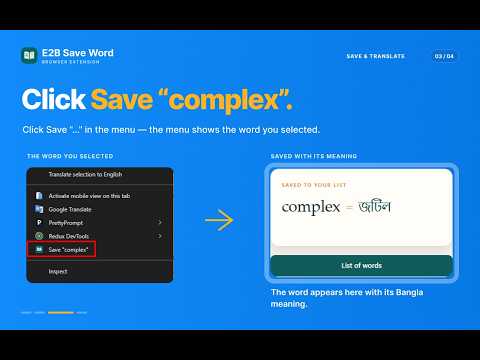
E2B Save Word is a fast, lightweight, and distraction-free English to Bangla vocabulary builder for Chrome. Never interrupt your reading flow to search for a word in a separate tab again! Whenever you come across an unfamiliar English word while browsing any website or reading an article, simply select it and right-click to instantly see its accurate Bangla meaning and save it to your personal vocabulary collection. Whether you are preparing for IELTS, GRE, BCS, competitive exams, or simply want to enrich your daily English vocabulary, E2B Save Word makes vocabulary learning seamless and effortless. ━━━━━━━━━━━━━━━━━━━━━━━━━━━━ ✨ KEY FEATURES ━━━━━━━━━━━━━━━━━━━━━━━━━━━━ • 1-Click Instant Save: Select any English word on any webpage, right-click, and click 'Save'. The word and its Bangla definition are saved immediately. • Instant Offline Bangla Meaning: Powered by a built-in offline dictionary of 13,500+ headwords with accurate Bangla meanings. No internet connection needed for lookups. • In-App Dictionary Search: Open the extension anytime to search directly across 13,500+ words. Found a word you like? Add it to your saved list with just one click (+). • A-to-Z Smart Vocabulary Dashboard: Easily browse your saved words grouped alphabetically from A to Z, or filter with instant live search. • Editable Definitions: Missing a specific sense or want to add your own notes? Easily edit and add custom Bangla definitions anytime. • Backup & Restore (Export/Import): Export your entire saved vocabulary as a clean JSON file and import it back anytime. Your hard work is always safe. • 100% Private & Ad-Free: Your data belongs strictly to you. All words are saved locally on your device (chrome.storage.local). No trackers, no data collection, no background scripts running on pages, and zero ads. ━━━━━━━━━━━━━━━━━━━━━━━━━━━━ 🚀 HOW TO USE ━━━━━━━━━━━━━━━━━━━━━━━━━━━━ 1. Highlight/Select any English word on any webpage. 2. Right-click the selected word and choose 'Save "[word]"'. 3. The popup automatically opens showing the word with its Bangla meaning and confirms it is saved. 4. Click the extension icon on your Chrome toolbar anytime to review your word list, filter A-Z, or search the dictionary directly. ━━━━━━━━━━━━━━━━━━━━━━━━━━━━ 🔒 PERMISSIONS & PRIVACY ━━━━━━━━━━━━━━━━━━━━━━━━━━━━ • contextMenus: Required solely to show the "Save..." option in the right-click menu when you select a word. • storage: Required to save your vocabulary list and custom notes locally on your computer. No host permissions, no content scripts, and no background tracking. Developed with care by RI Suvo (https://risuvo.com/).
5 out of 55 ratings
Details
- Version1.0.0
- UpdatedNovember 5, 2026
- Size203KiB
- LanguagesEnglish (United States)
- DeveloperWebsite
Email
rafiqulislamsuvobd@gmail.com - Non-traderThis developer has not identified itself as a trader. For consumers in the European Union, please note that consumer rights do not apply to contracts between you and this developer.
Privacy

This developer declares that your data is
- Not being sold to third parties, outside of the approved use cases
- Not being used or transferred for purposes that are unrelated to the item's core functionality
- Not being used or transferred to determine creditworthiness or for lending purposes
Support
For help with questions, suggestions, or problems, please open this page on your desktop browser