

YouTube Text Tools - Video Transcript and Summary

Overview
YouTube to text: transcribe YouTube video to text, get accurate YouTube transcript with AI summary. Convert YouTube video to text…
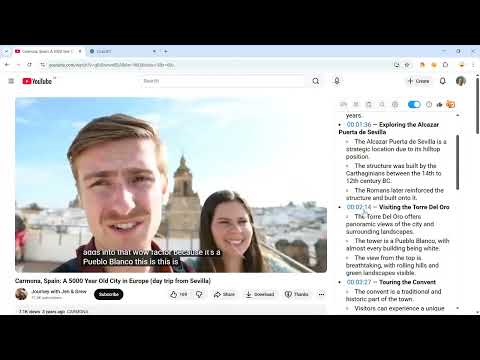
👉 How to get started 1. Install the extension by clicking on the "Add to Chrome" button. 2. Open any YouTube video. 3. Click "Transcribe" and get YouTube transcript with time codes, automatic scrolling and translations! ➖➖➖ Features ➖➖➖ 1️⃣ Transcribe YouTube Video to Text ➖ YouTube to Text converts any YouTube video to text format instantly. Get an accurate YouTube transcript of spoken content — perfect for those who prefer reading or need a written record. Our YouTube video transcriber supports all videos with captions in multiple languages. 2️⃣ Convert YouTube Video to Text with One Click ➖ Simply open any video and click to convert YouTube video to text. The transcript appears alongside the video with clickable timestamps. This YouTube to text converter makes it easy to jump to any point in the video. 3️⃣ Search Through Video Transcript ➖ Navigate quickly through the YouTube transcript to find specific information without watching the entire video. Search for keywords in the transcript — each result links to its timestamp, so you can jump directly to the relevant moment. 4️⃣ Copy Transcript to Note-Taking Apps ➖ Easily copy the YouTube video transcript to your favorite note-taking apps, personal knowledge bases, or AI summarizers. Get transcript of YouTube video and use it for research, study, or content creation. 5️⃣ Learn Foreign Languages ➖ Transcribe YouTube video in any language and read along while listening. YouTube to Text is an excellent tool for language learners to practice listening and reading skills simultaneously, improving comprehension and pronunciation. 6️⃣ Auto-Scroll Transcript with Video Playback ➖ The transcript syncs with video playback and scrolls automatically. Read the YouTube transcript in real time without manual adjustments — perfect for multitasking learners and professionals. 7️⃣ Get Video Summary with AI ➖ Generate a concise AI summary of any YouTube video. Absorb key insights from lengthy videos in seconds. This YouTube video to text transcription feature distills hours of content into digestible summaries. 8️⃣ Free YouTube Video to Text Converter ➖ YouTube to Text is completely free to use with no ads. Enjoy an uninterrupted experience — no distractions, just accurate video to text transcription. ➖➖➖ Why Choose YouTube to Text? ➖➖➖ 📝 Save Time with YouTube Transcript ➖ Stop manually transcribing videos. YouTube to Text provides instant, accurate transcription of any YouTube video to text format. Whether you're a content creator, student, or researcher — get transcript from YouTube video in seconds. 📈 YouTube Video to Text for Content Creators ➖ Transcribe YouTube video to text and repurpose content for blogs, articles, or social media. Use the YouTube transcript as a foundation for editing, saving hours of manual transcription work. 📖 Get Transcript of YouTube Video for Research ➖ Convert YouTube video to text and search for specific keywords, quotes, or insights within the transcript. YouTube to Text is ideal for academics, students, and professionals who need to extract information from video content efficiently. 🖥️ YouTube Video Transcriber for Any Language ➖ Our YouTube to text extension supports multiple languages. Transcribe YouTube video with captions or automatically generated subtitles in English, Spanish, Korean, Vietnamese, and 50+ other languages. ➖➖➖ Frequently Asked Questions ➖➖➖ ❓ How to transcribe YouTube video to text? 💡 Install YouTube to Text Chrome extension, open any YouTube video, and click "Transcribe". You'll get the full YouTube transcript with timestamps instantly. ❓ Can I convert any YouTube video to text? 💡 Yes! YouTube to Text can transcribe any YouTube video with captions into text format and supports multiple languages. Get transcript of YouTube video — whether it has manual or auto-generated captions. ❓ Is this YouTube to text converter free? 💡 Yes, YouTube to Text is completely free to use. We plan to introduce some premium features in the future. ❓ How to get transcript from YouTube video? 💡 Simply install the extension, open a YouTube video, and the transcript appears automatically. You can copy, search, and navigate through the YouTube video transcript with ease. ❓ Does this YouTube video transcriber keep my data private? 💡 Absolutely! The extension works locally in your browser. We don't collect or store any user data. Your privacy is our priority. ➖➖➖ Release notes ➖➖➖ https://youtubetexttools.com/releases.html
4.5 out of 571 ratings
Details
- Version1.5.8
- UpdatedMarch 12, 2026
- Size197KiB
- Languages55 languages
- DeveloperWebsite
Email
m4d.smith@gmail.com - Non-traderThis developer has not identified itself as a trader. For consumers in the European Union, please note that consumer rights do not apply to contracts between you and this developer.
Privacy

This developer declares that your data is
- Not being sold to third parties, outside of the approved use cases
- Not being used or transferred for purposes that are unrelated to the item's core functionality
- Not being used or transferred to determine creditworthiness or for lending purposes
Support
For help with questions, suggestions, or problems, please open this page on your desktop browser