

Balises Hn Check Reviews, Filtering ✅

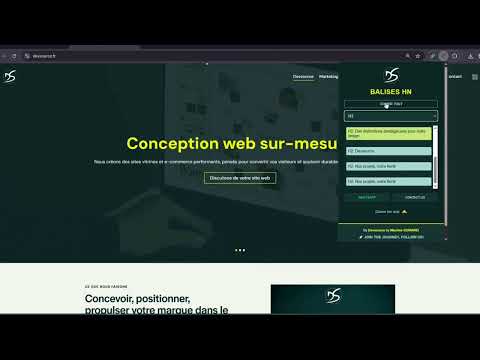
Overview
Balises Hn Check Reviews : Copiez le balisage Hn des pages web ⭐
Transform Your Browsing Experience with the Hn Tag Highlighter Extension The Hn Tag Highlighter is a powerful Google Chrome extension designed to fundamentally improve the way you analyze and understand the structure of web pages. Whether you are a developer, SEO specialist, designer, content strategist, or simply someone who wants a clearer view of how content is organized online, this extension gives you instant structural visibility with precision and simplicity. Headings are the backbone of web content. H1, H2, H3, H4, H5, and H6 tags define hierarchy, structure, semantic clarity, and accessibility. They guide both users and search engines through the logical flow of information. Yet identifying and analyzing them often requires inspecting source code or manually scanning layouts. The Hn Tag Highlighter eliminates that friction by instantly revealing heading tags directly on the page. Instead of digging through HTML or using developer tools, you get immediate visual feedback that highlights each heading level clearly and consistently. This allows you to understand content hierarchy in seconds. Core Features Instant Hn Tag Highlighting The extension automatically detects and highlights all H1, H2, H3, H4, H5, and H6 tags present on a webpage. Each heading is visually emphasized in bright yellow, ensuring it stands out clearly from the rest of the content. This immediate visibility allows you to analyze structure without switching tabs or opening source code. Clear and Distinct Tag Identification Every highlighted heading includes a clear label indicating its tag type (H1, H2, H3, and so on). This eliminates ambiguity and allows for rapid differentiation between levels. You can instantly assess whether a page respects structural hierarchy best practices or if improvements are needed. Simple and Intuitive Operation The extension is designed for efficiency. With a single click on the Chrome toolbar icon, you can activate or deactivate the highlighting feature. This toggle functionality allows you to seamlessly switch between analysis mode and normal browsing mode without disrupting your workflow. Why Heading Structure Matters Heading tags play a critical role in: Search engine optimization and semantic clarity Content hierarchy and logical flow Accessibility for screen readers User experience and readability Technical audits and content quality checks A well-structured heading system improves crawlability, comprehension, and engagement. Conversely, poorly structured headings can harm both user experience and SEO performance. The Hn Tag Highlighter provides an immediate visual audit of these elements, allowing you to identify issues such as: Multiple H1 tags Skipped hierarchy levels (e.g., H2 to H4) Missing primary headings Overuse of certain heading levels Inconsistent structural patterns Designed for Professionals For Web Developers The extension allows developers to quickly assess structural integrity without manually inspecting HTML. It significantly reduces the time required for audits, debugging, or structural validation. Instead of searching through source code, you see the hierarchy directly on the rendered page. For Designers Designers can instantly visualize content hierarchy, making it easier to evaluate layout logic and visual balance. Understanding heading distribution helps refine spacing, typography, and section flow. For SEO Specialists SEO professionals can immediately verify whether heading usage aligns with best practices. Structural clarity is a key ranking factor, and being able to audit it visually enhances both speed and accuracy. For Content Creators and Editors Writers and editors can evaluate how their content is structured once published. This ensures that key sections are properly emphasized and that the content hierarchy supports readability and navigation. Enhance Your Reading and Analysis Experience Beyond professional use cases, the extension improves everyday browsing. When reading long articles, blog posts, or technical documentation, you can quickly identify major sections and subsections. This enhances comprehension and makes navigation through complex content far more efficient. Instead of scrolling aimlessly, you immediately understand the structure and importance of each section. Lightweight and Efficient The Hn Tag Highlighter is optimized for performance. It runs directly in your browser and applies visual highlighting without significantly impacting page speed or responsiveness. The clean interface ensures that the added labels remain clear without overwhelming the page design. Privacy and Permissions The extension requires permission to access the content of the websites you visit in order to detect and highlight heading tags. This access is strictly necessary for functionality. The analysis is performed locally within your browser environment. Upgrade the Way You Analyze the Web Stop manually scanning source code to understand page structure. The Hn Tag Highlighter provides instant structural clarity with a single click. It streamlines audits, improves efficiency, and enhances your understanding of web content architecture. Install the Hn Tag Highlighter now and transform the way you navigate, analyze, and structure web content. Discord help: https://discord.com/invite/K2uUHdf Tools Discord: https://discord.gg/Qce5aFRxSm Gtool: https://gtool.fr/ Website : https://dev-maxime-guinard.fr/ Thank you. -- Transformez votre expérience de navigation avec l’extension Hn Tag Highlighter Hn Tag Highlighter est une extension Google Chrome conçue pour améliorer radicalement votre manière d’analyser la structure des pages web. Que vous soyez développeur, spécialiste SEO, designer, rédacteur ou simplement curieux de comprendre l’organisation d’un site, cette extension vous offre une visibilité immédiate et précise sur la hiérarchie des contenus. Les balises H1, H2, H3, H4, H5 et H6 constituent l’ossature d’une page web. Elles définissent la hiérarchie, la logique de lecture, la sémantique et l’accessibilité. Pourtant, leur analyse nécessite souvent l’inspection du code source ou l’utilisation d’outils développeur. Hn Tag Highlighter simplifie totalement ce processus en mettant en évidence ces balises directement sur la page. Fonctionnalités principales Mise en évidence instantanée Toutes les balises H1 à H6 sont automatiquement détectées et surlignées en jaune vif. Cette visibilité immédiate permet d’identifier rapidement la structure sans ouvrir le code HTML. Identification claire des niveaux Chaque titre mis en évidence comporte une étiquette indiquant clairement son niveau (H1, H2, H3, etc.). Cela permet d’évaluer rapidement la cohérence de la hiérarchie. Activation et désactivation en un clic Un simple clic sur l’icône de l’extension permet d’activer ou de désactiver l’affichage. Vous passez instantanément du mode navigation classique au mode analyse structurelle. Pourquoi la hiérarchie des titres est essentielle Les balises Hn jouent un rôle central dans : Le référencement naturel L’accessibilité La compréhension du contenu L’expérience utilisateur La structure éditoriale Une mauvaise hiérarchie peut nuire à la lisibilité et aux performances SEO. Grâce à cette extension, vous identifiez immédiatement les erreurs structurelles telles que des niveaux sautés, des H1 multiples ou une organisation incohérente. Un outil pensé pour les professionnels Développeurs Analysez la structure d’une page sans parcourir le code source. Designers Visualisez instantanément la hiérarchie pour ajuster la mise en page et l’équilibre visuel. Consultants SEO Vérifiez la conformité des balises avec les bonnes pratiques de référencement. Rédacteurs Contrôlez la structure réelle de vos contenus publiés. Optimisez votre lecture et vos audits Lors de la lecture d’articles longs ou de documents techniques, vous identifiez immédiatement les sections principales et secondaires. Cela améliore la compréhension et facilite la navigation. Performance et confidentialité L’extension fonctionne directement dans votre navigateur et applique les surlignages sans ralentir la navigation. Elle nécessite l’accès aux pages visitées afin de détecter les balises Hn. L’analyse s’effectue localement dans l’environnement du navigateur. Simplifiez vos audits structurels et améliorez votre compréhension des pages web avec Hn Tag Highlighter. Discord help: https://discord.com/invite/K2uUHdf Tools Discord: https://discord.gg/Qce5aFRxSm Gtool: https://gtool.fr/ Website : https://dev-maxime-guinard.fr/ Merci.
4.9 out of 521 ratings
Details
- Version3.0
- UpdatedFebruary 13, 2026
- Size55.9KiB
- Languagesfrançais
- DeveloperMaxime GUINARDWebsite
196 Avenue du Général de Gaulle Champigny-sur-Marne 94500 FREmail
dev@maxime-guinard.frPhone
+33 6 65 13 24 36 - TraderThis developer has identified itself as a trader per the definition from the European Union and committed to only offer products or services that comply with EU laws.
Privacy

This developer declares that your data is
- Not being sold to third parties, outside of the approved use cases
- Not being used or transferred for purposes that are unrelated to the item's core functionality
- Not being used or transferred to determine creditworthiness or for lending purposes
Support
For help with questions, suggestions, or problems, visit the developer's support site