


Overview
Record once, generate videos, demos, guides & animations. When your product changes, regenerate — never re-record again.
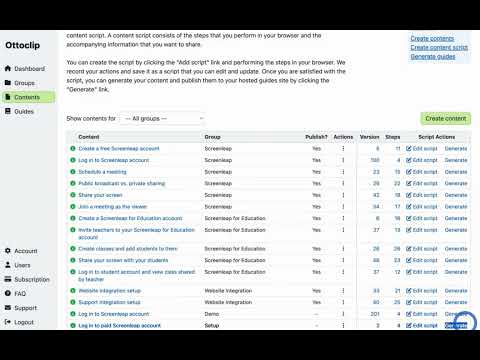
Your product ships an update. Now the scramble begins — re-recording videos, rebuilding demos, fixing outdated walkthroughs across three different tools. Static screenshot-and-text guides go stale fastest because nobody wants to re-capture thirty screenshots every time a button moves. By the time you're done, the next release is already shipping. Ottoclip fixes this. Record your product flow once, generate narrated videos, interactive demos, guided walkthroughs, and animations — all from a single recording. When your product changes, update the script and hit regenerate. Every asset updates. No re-recording. No rebuilding. Teams with static screenshot guides can replace them with Ottoclip's interactive formats — callouts, annotations, and step-by-step flows users actually engage with. Start for free. Create your first content in minutes. No credit card required. HOW IT WORKS Step 1 – Record Once Walk through your product using the Ottoclip browser extension. Define steps and add narration as you go. Ottoclip captures your product's structure and interactions — not just pixels on screen. Step 2 – Generate Everything From that single recording, generate narrated videos, interactive demos, guided walkthroughs, and animations. Customize narration, branding, and flow. Publish to your website, sales deck, help center, or onboarding sequence. Step 3 – Regenerate When You Ship Product updated? Update the script and hit regenerate. Ottoclip captures the new product state and updates every asset — same narrative, same branding, current product. Create content in minutes. Regenerate in seconds. WHAT YOU CAN GENERATE • Narrated Product Videos — Polished walkthroughs without video editing or post-production. Use for product tours, feature announcements, and customer education. • Interactive Demos — Click-through experiences that reflect your current product, no sandbox required. Use for sales leave-behinds, website demos, and PLG flows. • Guided Walkthroughs — Step-by-step in-app guidance delivered directly inside your product. The browser extension highlights exactly which fields to fill out, which buttons to click, and in what order — with a live task list that updates as each action is completed. When your product changes, regenerate and every step updates automatically. Use for employee onboarding, customer onboarding, training, and support. • Animations — Smooth animated sequences for social media, landing pages, pitch decks, and feature teasers. Every format from one recording. Every format updated with one regeneration. REPLACE THREE TOOLS WITH ONE Today you're juggling separate tools that each handle one format and break independently when you ship: • Screen recorders (Loom, Vidyard) — for videos • Demo platforms (Navattic, Walnut) — for click-through demos • Digital adoption tools (WalkMe, Pendo) — for guided walkthroughs Ottoclip replaces all of them. One recording. Every format. One regeneration updates everything. Teams currently using static guide builders (Scribe, Tango) for screenshot-and-text documentation can also switch to Ottoclip's interactive formats — eliminating an additional tool while upgrading from static screenshots to interactive visuals with callouts and step-by-step flows users actually engage with. WHO IT'S FOR Ottoclip works with any product that runs in a web browser — SaaS platforms, e-commerce sites, online marketplaces, fintech portals, edtech tools, healthtech dashboards, and more. • Marketing — Generate product videos and website demos without editing pipelines or rebuild cycles. • Sales — Send demos that match what prospects will actually see. No more "that screen looks different now." • Support — Guided walkthroughs delivered inside your product that match the current UI. Regenerate after every release. • Product — Ship without breaking content downstream. One regeneration gives every team current assets. HOW IS THIS DIFFERENT? Different from screen recorders like Loom: Loom captures pixels. When your product changes, you re-record from scratch. Ottoclip captures your product's structure, generates multiple formats, and regenerates everything when your product changes. Different from demo tools like Navattic or Walnut: Demo platforms produce click-through demos only — no videos, no in-app walkthroughs, no animations. When your product changes, you rebuild each demo manually. Ottoclip generates every format from a single recording and regenerates all of them at once. Different from static guide builders like Scribe or Tango: Static guide builders capture screenshots and pair them with text instructions. They go stale with every UI change and nobody wants to re-capture thirty screenshots every time a button moves. Ottoclip replaces static screenshots with interactive visual formats — narrated videos, interactive demos, and guided walkthroughs with callouts, annotations, and step-by-step flows. When your product changes, regenerate and every asset updates automatically. DO I NEED TECHNICAL SKILLS? No. If you can click through your product, you can use Ottoclip. No coding, no scripting, no video editing. Define the steps, type the narration — Ottoclip handles the rest. GET STARTED Start for free. Create your first content in minutes. No credit card required. Visit ottoclip.com to learn more.
0 out of 5No ratings
Details
- Version1.0.61
- UpdatedMarch 10, 2026
- FeaturesOffers in-app purchases
- Size299KiB
- LanguagesEnglish (United States)
- DeveloperCollectiveSoft, Inc.Website
808 Bauer Drive San Carlos, CA 94070 USEmail
support@ottoclip.comPhone
+1 650-241-8575 - TraderThis developer has identified itself as a trader per the definition from the European Union and committed to only offer products or services that comply with EU laws.
- D-U-N-S076204019
Privacy

Ottoclip has disclosed the following information regarding the collection and usage of your data. More detailed information can be found in the developer's privacy policy.
Ottoclip handles the following:
This developer declares that your data is
- Not being sold to third parties, outside of the approved use cases
- Not being used or transferred for purposes that are unrelated to the item's core functionality
- Not being used or transferred to determine creditworthiness or for lending purposes
Support
For help with questions, suggestions, or problems, please open this page on your desktop browser