

Pixefy - Responsive Design Checker

Overview
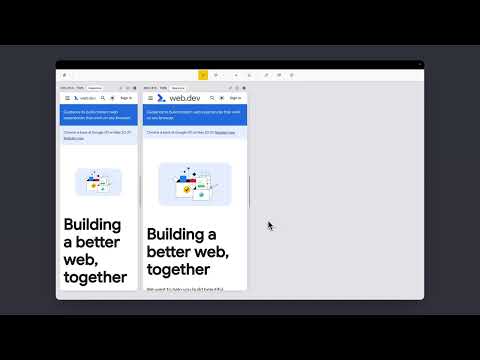
Preview and debug your website’s responsiveness across multiple devices in real-time, all inside one browser tab.
Pixefy helps you spot layout issues instantly and fine-tune designs with live editing tools – right as you build. It simplifies responsive testing by letting you preview, debug, and edit across multiple screen sizes in one place – no more switching tabs or resizing windows manually. 🚀 Key Features: ✔️ 🟢🟠 Live Responsive Previews – Test across multiple screen sizes side-by-side. Scroll, click, and interact on all screens simultaneously. Match real devices with optional browser bars + native UI spacing. ✔️ 🟠 Custom Screens & Presets – Create and save your own breakpoints, or use popular device resolutions out of the box. ✔️ 🟢 Screen Management – Rearrange, stack (horizontal/vertical), rotate, or zoom screens globally for a flexible workspace. ✔️ 🟢🟠 Inspect & X-Ray – Inspect styles, edit attributes live, and debug layouts with Visual Box Model, grids, and X-Ray overlays. ✔️ 🟢🟠 CSS Debugging Tools – View/edit computed styles, measure distances between elements, compare two elements, and track all changes in the Activity Tab. ✔️ 🟠 Content Editing – Instantly replace text or images, and check word/character counts directly on the page. ✔️ 🟠 Asset Downloads – Extract SVGs, PNGs, and other assets directly from Inspect Tool tabs. ✔️ 🟢 Screenshots & Annotations – Capture full pages, visible areas, or selected regions, then add notes, arrows, and highlights for clear, shareable feedback. ✔️ 🟠 User Agent Switching – Simulate different devices, browsers, or bots to see how your site adapts. ✔️ 🟠 Accessibility Tools – Test AA/AAA contrast ratios, extract all colors, and preview vision impairments with blindness simulations. ✔️ 🟢 Utilities – Live Dimension Widget (viewport width/height), copy any value or asset to clipboard, clear cache & refresh Pixefy. ✔️ 🟠 Themes – Switch between website's light and dark mode instantly. ✔️ 🟠 SEO Overview – Get a quick overview of key on-page SEO elements, including titles, meta descriptions, headings, and other essential page data. ✔️ 🟢 Touch Simulation – Simulate touch interactions to preview how websites behave on touch-based devices. Pixefy is regularly updated based on user feedback. Report issues or share ideas: www.pixefy.io/feedback See what’s new: www.pixefy.io/changelog
4.6 out of 531 ratings
Details
- Version1.0.9
- UpdatedMarch 13, 2026
- FeaturesOffers in-app purchases
- Size2.22MiB
- LanguagesEnglish
- Developer
- Non-traderThis developer has not identified itself as a trader. For consumers in the European Union, please note that consumer rights do not apply to contracts between you and this developer.
Privacy

Pixefy - Responsive Design Checker has disclosed the following information regarding the collection and usage of your data. More detailed information can be found in the developer's privacy policy.
Pixefy - Responsive Design Checker handles the following:
This developer declares that your data is
- Not being sold to third parties, outside of the approved use cases
- Not being used or transferred for purposes that are unrelated to the item's core functionality
- Not being used or transferred to determine creditworthiness or for lending purposes
Support
For help with questions, suggestions, or problems, please open this page on your desktop browser