


Overview
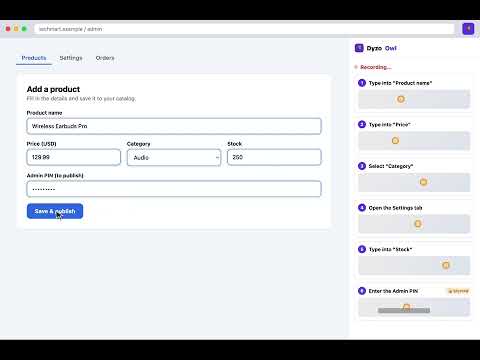
Record any workflow across tabs and sites into a step-by-step guide. Edit right in the sidebar. Auto-blurs passwords.
Dyzo Owl turns anything you do in your browser into a polished, step-by-step guide (SOP) — automatically. Open the side panel, hit Start recording, and do your task. Dyzo Owl captures each click with a screenshot and writes the step for you. Switch tabs or visit any website — it's all captured into one guide. When you're done, review and edit the steps right in the sidebar, then save. WHAT YOU GET • Automatic step capture — every click becomes a step with a screenshot • A marker showing exactly where you clicked • Passwords are auto-blurred so secrets never end up in your screenshots • Edit, reorder, and delete steps in the side panel before saving • Save to your Dyzo Owl account to annotate, blur, share a link, or export to PDF / HTML / Markdown PERFECT FOR • Onboarding and training new team members • Client handovers and how-to documentation • QA steps and bug reproductions • Standard operating procedures (SOPs) HOW IT WORKS 1. Click the Dyzo Owl icon to open the side panel and log in (one click). 2. Press Start recording and run through your process. 3. Press Stop & review, tidy up the steps, and Save. Your guide opens at owl.dyzo.ai where you can annotate, share, and export. PRIVACY Dyzo Owl only captures screenshots and clicks WHILE you are actively recording — it does nothing in the background and does not track your browsing. Password fields are automatically blurred. See our privacy policy: https://owl.dyzo.ai/privacy
0 out of 5No ratings
Details
- Version0.5.2
- UpdatedJune 6, 2026
- Size28.21KiB
- LanguagesEnglish
- DeveloperChitragupt PandeyWebsite
New Munim Colony Bijainagar, Rajasthan 305624 INEmail
cg@prpwebs.comPhone
+91 92149 30277 - TraderThis developer has identified itself as a trader per the definition from the European Union and committed to only offer products or services that comply with EU laws.
Privacy

Dyzo Owl — SOP & Guide Recorder has disclosed the following information regarding the collection and usage of your data. More detailed information can be found in the developer's privacy policy.
Dyzo Owl — SOP & Guide Recorder handles the following:
This developer declares that your data is
- Not being sold to third parties, outside of the approved use cases
- Not being used or transferred for purposes that are unrelated to the item's core functionality
- Not being used or transferred to determine creditworthiness or for lending purposes
Support
For help with questions, suggestions, or problems, visit the developer's support site