

Dynamic Chromeland
5 ratings
)
Overview
Chrome version of dynamic island for increased productivity.
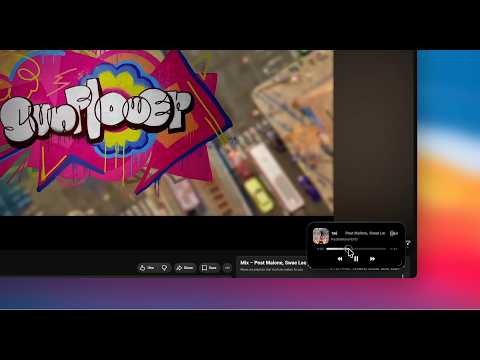
Inspired by Apple's Dynamic Island, Dynamic Chromeland brings a touch of modern design and convenience to your browser. Keep your media controls always within reach, no matter where you are in the browser. Whether you're watching a video or listening to music, play, pause, skip, or seek with a glance without searching for the audio tab. The floating island integrates naturally into your browsing experience, providing you quick access to the controls you need without distraction. 🚀 Features: ✨ Smart Stack All your cards, always within reach. Smart Stack lets you move between cards without taking up additional space. ➤ Hold (⌥ / Alt) and scroll to cycle through cards. Press (⌥⇧F / Alt+Shift+F) to switch between cards, or click the vertical dots on the right side of the island. ✨ Audio Card Stay in control of your media. When you play audio or video on YouTube, YouTube Music, or Spotify, the Audio Card appears in the bottom-right corner of the page. Use it to control playback. ➤ Press (⌥⇧D / Alt+Shift+D) to show or hide the island. Click the island to return to the source tab, or use the playback controls to control your media. ✨ Video Stream Stream video live. Expand the Audio Card into a video stream to watch your media without switching tabs. ➤ Press (⌥⇧E / Alt+Shift+E) or click the arc in the bottom-right corner from the Audio Card to expand the video stream. ✨ Tabs Card Keep your audio tabs in one place. Tabs Card brings audio from your opened audio tabs together, making it easy to switch between sources or close them. ➤ Press (⌥⇧E / Alt+Shift+E) to expand the card, or click the arc in the bottom-right corner. Click a row to switch to its corresponding audio tab, or click ⊖ to close the tab. ✨ Compact Mode More room when you need it. Compact Mode scales the island down for smaller page sizes while keeping your media controls within reach. ➤ Press (⌥⇧C / Alt+Shift+C) to switch to Compact Mode. On smaller page sizes, the island automatically scales to Compact Mode. ✨ Settings Make the island your own. Use the Settings Panel to control how the island appears and behaves. ➤ Click the extension icon in your browser toolbar to open the Settings Panel. From there, you can toggle the island's visibility and choose from the available island modes. ⭐ What’s New (v1.8.1) • Introducing Video Stream • Minor bugs fixes Stay in control of your media — effortlessly. More to come.
4.2 out of 55 ratings
Details
- Version1.8.1
- UpdatedAugust 16, 2026
- Offered bydesmondgan
- Size159KiB
- LanguagesEnglish
- Developer
Email
tengjiegan@gmail.com - Non-traderThis developer has not identified itself as a trader. For consumers in the European Union, please note that consumer rights do not apply to contracts between you and this developer.
Privacy

This developer declares that your data is
- Not being sold to third parties, outside of the approved use cases
- Not being used or transferred for purposes that are unrelated to the item's core functionality
- Not being used or transferred to determine creditworthiness or for lending purposes
Support
For help with questions, suggestions, or problems, please open this page on your desktop browser