


Overview
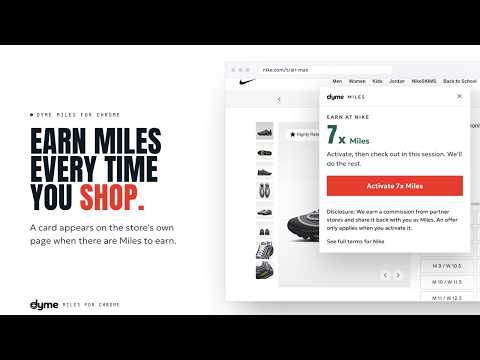
Earn Dyme Miles when you shop at thousands of stores online.
Dyme Miles turns everyday shopping into travel. Add Dyme to Chrome and a small card appears when there are Miles to earn, at thousands of stores you already shop. Click to activate, check out as usual, and your Miles arrive once the store confirms your order. Then spend them on travel: any hotel or flight you book on Dyme, with no blackout dates and no restrictions, or turn them into hundreds of gift cards. What you get: • Earn Dyme Miles across thousands of stores, millions of hotels, and hundreds of airlines • Stack Miles on top of the credit-card points and hotel or airline status you already earn • Redeem on any flight or hotel with no blackout dates, or on hundreds of gift cards • No expiry while your account is open • Private by design: the extension reads pages on your device and sends nothing to Dyme until you click to activate an offer • Free to install and free to use Disclosure: We earn a commission from partner stores and share it back with you as Miles. An offer only applies when you activate it. Questions? Visit dyme.earth/shop/extension for FAQs, or reach us at dyme.earth/contact.
5 out of 54 ratings
Details
- Version0.3.1
- UpdatedSeptember 30, 2026
- Size109KiB
- LanguagesEnglish (United States)
- DeveloperDyme Digital IncWebsite
16192 Coastal Hwy Lewes, DE 19958-3608 USEmail
hello@dyme.earthPhone
+1 650-450-0548 - TraderThis developer has identified itself as a trader per the definition from the European Union and committed to only offer products or services that comply with EU laws.
- D-U-N-S118299578
Privacy

Dyme Miles - Shopping Rewards has disclosed the following information regarding the collection and usage of your data. More detailed information can be found in the developer's privacy policy.
Dyme Miles - Shopping Rewards handles the following:
This developer declares that your data is
- Not being sold to third parties, outside of the approved use cases
- Not being used or transferred for purposes that are unrelated to the item's core functionality
- Not being used or transferred to determine creditworthiness or for lending purposes
Support
For help with questions, suggestions, or problems, visit the developer's support site