

DVD Screensaver - Bouncing Logo
6 ratings
)
Overview
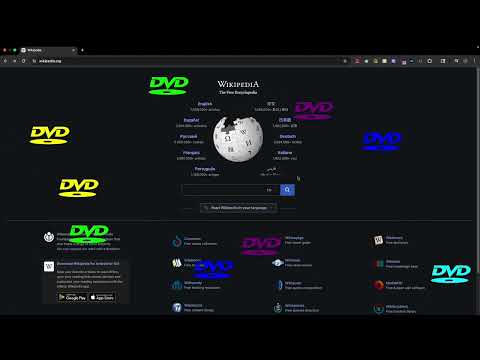
Add a classic bouncing DVD logo to any webpage in one click. Customize size and speed, add multiple logos, and enable collisions.
Bring the classic DVD screensaver to the webpages you visit. Click the toolbar button and a color-changing DVD logo glides across the current tab, bouncing from edge to edge while you browse. FEATURES • Add a logo with one click, including on tabs that were already open • Click again to add multiple logos • Change color on every wall bounce • Click any logo to remove it • Choose a size from 50–300 px • Adjust animation speed from 0.2×–3× • Turn optional collisions between logos on or off • Preview settings live and save preferences automatically HOW TO USE 1. Pin DVD Screensaver from Chrome's Extensions menu. 2. Open a regular webpage and click the toolbar icon. 3. Right-click the icon and choose Options to adjust the animation. PRIVACY No analytics, tracking or personal-data collection. The extension runs only after you click its toolbar icon, uses temporary access to the active tab and does not connect to third-party services. Preferences are stored with Chrome and may sync across your signed-in browsers. The extension works on all websites, including tabs that were already open when you installed or enabled it. This independent fan-made extension is not affiliated with or endorsed by any DVD standards or media organization.
3.5 out of 56 ratings
Details
- Version1.2.1
- UpdatedAugust 16, 2026
- Offered byjessejesse10
- Size26.28KiB
- LanguagesEnglish
- Developer
Email
jessejesse10@gmail.com - Non-traderThis developer has not identified itself as a trader. For consumers in the European Union, please note that consumer rights do not apply to contracts between you and this developer.
Privacy

This developer declares that your data is
- Not being sold to third parties, outside of the approved use cases
- Not being used or transferred for purposes that are unrelated to the item's core functionality
- Not being used or transferred to determine creditworthiness or for lending purposes