

Duplicate Finder for Google Photos
2 ratings
)
Overview
Find and remove duplicate photos and videos in Google Photos, even compressed copies. Count and export albums. Not made by Google.
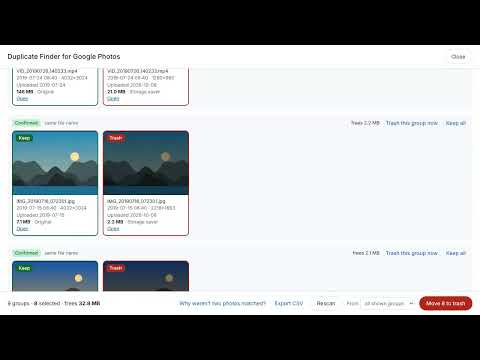
Clean up your Google Photos library: find duplicate photos and videos, even when one copy is compressed, and move the copies you don't need to the trash. Most duplicate finders only catch files that are byte-for-byte identical. Duplicate Finder for Google Photos compares how your photos and videos actually look, so it also finds: • the original and its "Storage saver" (compressed) copy • photos re-uploaded from an old backup or another phone • copies forwarded through messaging apps, with a different name or size HOW IT WORKS 1. Open photos.google.com and click "Find duplicates". 2. Scan your library. Large libraries (100,000+ items) are supported, and progress is saved so you can stop and resume. 3. Review the groups. "Confirmed" groups look the same AND share a file name or capture time; "Check" groups only look alike, so you decide. 4. Move the copies you don't need to the Google Photos trash in one click, a group at a time, or in batches. SMART CHOICES • Keeps the oldest copy by default, so re-uploads don't clutter your timeline. You can also keep the smallest or the highest-quality copy. • If a removed copy was a favorite, the kept copy becomes a favorite. • Never pre-selects look-alikes that might be burst shots. • "Why weren't these matched?" checker: paste two photo links and see exactly why. COUNT AND EXPORT • See how many items are in any album, shared album, your favorites, archive, library or trash. • Export the list as a CSV file (file name, date taken, dimensions, size, quality, link). • See how much storage emptying the trash will free. SAFE AND PRIVATE • Nothing is deleted until you confirm. Removed items go to the Google Photos trash and can be restored for 60 days. • Everything runs in your browser. Your photos and their details are never sent to the developer or to any third party. • No account, no tracking, no ads. NOTES • Works on photos.google.com in Chrome and other Chromium-based browsers. • Duplicate Finder for Google Photos is an independent tool, not affiliated with or endorsed by Google. Google Photos is a trademark of Google LLC.
5 out of 52 ratings
Details
- Version2.0.0
- UpdatedOctober 13, 2026
- Offered byDavid Molino
- Size41.71KiB
- LanguagesEnglish
- Developer
Email
david@agonora.com - Non-traderThis developer has not identified itself as a trader. For consumers in the European Union, please note that consumer rights do not apply to contracts between you and this developer.
Privacy

Duplicate Finder for Google Photos has disclosed the following information regarding the collection and usage of your data. More detailed information can be found in the developer's privacy policy.
Duplicate Finder for Google Photos handles the following:
This developer declares that your data is
- Not being sold to third parties, outside of the approved use cases
- Not being used or transferred for purposes that are unrelated to the item's core functionality
- Not being used or transferred to determine creditworthiness or for lending purposes