


Overview
Translator for subtitles. Create dual-language subtitles directly in your browser using Google Apps Script.
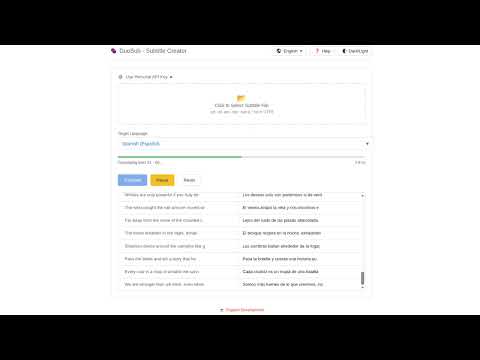
DuoSub is a lightweight and powerful tool designed for creators, language learners, and cinema enthusiasts. It allows you to transform standard subtitle files into dual-language formats, making it perfect for practicing a new language or making content more accessible to international audiences. Using the reliability of Google Apps Script, DuoSub processes your files directly in the browser, ensuring a smooth and intuitive workflow without the need for complex external software. Key Features: Complete Multilingual Support: Experience total freedom with support for all languages available in Google Translate. Whether your source file is in a rare dialect or a major global language, DuoSub can translate both from and to any supported language with ease. Effective Dual-Language Output: After processing, the translation is inserted as a second line in your subtitle file. This dual-language display is a powerful way to learn foreign languages by comparing sentences in real-time or simply to enjoy your favorite movies and TV shows with accurate translations. Format Compatibility: Seamlessly works with popular subtitle standards like SubRip, WebVTT, and Advanced Substation Alpha. It also handles plain text files with UTF-8 encoding. Universal Player Support: The generated files are standard subtitle tracks that work across all major platforms. You can easily use them in popular video players like VLC Media Player, MPC-HC, or upload them to web-based platforms. Smart Parsing: Maintains technical timestamps and original formatting, including specialized styles for advanced subtitle types. Personal Integration & High Volume: While the extension includes built-in capabilities, you can easily connect your own Google Apps Script. This is ideal for heavy users or if you encounter translation limits, allowing for a completely independent and unlimited personal experience via your own API. Detailed setup steps are available on our Help page. Privacy-Focused: Your files are processed locally in your browser. We do not store your subtitle content on our servers. User-Friendly Interface: Modern design with dark and light mode support, featuring a real-time translation progress tracker. How to use: 1. Upload your subtitle file. 2. Select your target language. 3. Click "Translate" and watch the progress in the preview window. 4. Download your new dual-language subtitle file and enjoy!
0 out of 5No ratings
Details
- Version1.0.0
- UpdatedJanuary 2, 2026
- Size21.78KiB
- LanguagesEnglish (United States)
- DeveloperWebsite
Email
duosubmail@gmail.com - Non-traderThis developer has not identified itself as a trader. For consumers in the European Union, please note that consumer rights do not apply to contracts between you and this developer.
Privacy

DuoSub - Subtitle Creator has disclosed the following information regarding the collection and usage of your data. More detailed information can be found in the developer's privacy policy.
DuoSub - Subtitle Creator handles the following:
This developer declares that your data is
- Not being sold to third parties, outside of the approved use cases
- Not being used or transferred for purposes that are unrelated to the item's core functionality
- Not being used or transferred to determine creditworthiness or for lending purposes
Support
For help with questions, suggestions, or problems, please open this page on your desktop browser