

Dudu and Bubu — My Pet Buddy
1 rating
)
Overview
Meet Dudu and Bubu, two pets for desktop Chrome. Care for a pet, play on-page games, save local tasks and take focus breaks.
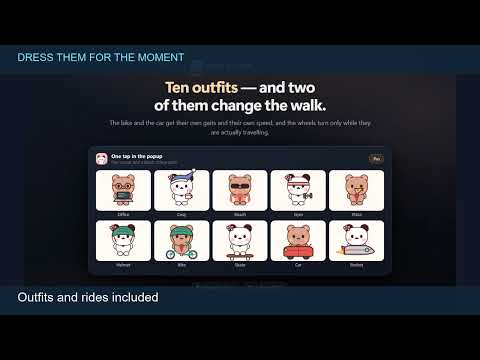
Dudu and Bubu — My Pet Buddy A cute virtual pet for Chrome Meet Dudu, the brown bear, and Bubu, the white panda. Pick a browser companion who waves, wanders and naps while you read, study or work. Feed your pet, play a quick mini-game or start a focus timer when it’s time to get back to a task. 🎯 A little company while you browse ⭐ Choose your companion Pick Dudu with his red bow tie or Bubu with her little flower. Either is free. Optional greetings appear as quiet text bubbles. ⭐ Quiet naps and wandering Watch your pet curl up and wake with a stretch. Set screensaver-style wandering to explore the page after 2, 5, 10 or 30 minutes of inactivity, or switch it off. 🐾 Pet care and mini-games ⭐ Feed, bathe and play Offer kibble or a cookie, hold and rub to finish a bath, or toss a ball for your pet to chase. Build a daily care streak and earn charms as you go. ⭐ Star Chase and Mushroom Rush Watch your pet chase stars in a 15-second round. Free includes one round per day. Pro adds unlimited rounds and Mushroom Rush, a 20-second game where your pet grows as it catches mushrooms. ⏱️ A small to-do list and focus timer ⭐ Local tasks Save your next steps in a simple to-do list. Free keeps up to two saved tasks, including completed tasks until you delete them. Pro removes the limit. ⭐ Focus Buddy Choose an unfinished task and set a 15, 25 or 45-minute session. Pause, resume or take an optional five-minute break. You decide when to mark the task done. ⭐ Gentle reminders Turn on water, blink or posture reminders, or opt in to occasional encouragement. Messages appear beside your pet on enabled webpages while Chrome is open. 🎨 Make it fit your page ⭐ Placement and visibility Drag your pet, pin it to a corner or tuck it at the edge. Click the handle to bring it back. Change size or opacity, reduce motion or hide it on selected sites. Suggested shortcut: Alt+Shift+9 on Windows or Control+Shift+9 on Mac. Check the popup for your actual shortcut. Change it at chrome://extensions/shortcuts. ⭐ More ways to customise with Pro Bring both pets together for occasional hugs, high-fives and dances. Choose from 14 outfits, set custom names and colours, or turn on optional typing and video reactions. ✨ Free to start Eligible installations start a seven-day Pro trial with no card and no automatic charge. Free remains available after the trial. 🔒 Privacy and compatibility Care progress, tasks, settings and scores stay in your Chrome profile. Optional reactions use typing and playback signals without saving typed content or video URLs. Paid licence checks contact Lemon Squeezy. Works on supported webpages in desktop Chrome 111+. The pet does not appear on browser settings, new tabs, the Chrome Web Store or the built-in PDF viewer. Choose English or Simplified Chinese in the extension. Made by Kartik Labs. Learn more: https://kartiklabs.in/pet Support: support@kartiklabs.in
5 out of 51 rating
Details
- Version1.5.1
- UpdatedNovember 8, 2026
- Offered bykartiklabsinfo
- Size135KiB
- LanguagesEnglish
- Developer
Email
support@kartiklabs.in - Non-traderThis developer has not identified itself as a trader. For consumers in the European Union, please note that consumer rights do not apply to contracts between you and this developer.
Privacy

This developer declares that your data is
- Not being sold to third parties, outside of the approved use cases
- Not being used or transferred for purposes that are unrelated to the item's core functionality
- Not being used or transferred to determine creditworthiness or for lending purposes
Support
For help with questions, suggestions, or problems, visit the developer's support site