

Dude - AI Browser Assistant

概要
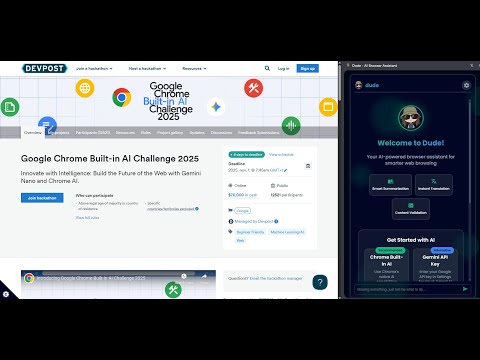
AI-powered browser assistant for summarizing, translating, and validating web content
Competition Submission for Chrome Built-in AI Challenge 2025 Transform your web browsing experience with intelligent AI assistance that respects your privacy! 🎯 WHAT'S NEW IN v0.0.2: ✓ Chrome Web Store compliant (removed unused scripting permission) ✓ Fixed temporal context in validation (no more false "speculation" flags) ✓ Auto-translate workaround for Built-in AI language limitations ✓ Enhanced privacy with minimal 3-permission model 🧠 KEY FEATURES: • 📄 Smart Summarization - Extract key points from articles with configurable length, type, and format • 🌐 Multi-Language Translation - Translate to 15+ languages with automatic detection • ✅ Content Validation - Check credibility, identify bias, and verify facts with temporal awareness • ✏️ Intelligent Rewriting - Improve clarity, adjust tone, and modify complexity • 🎯 Custom Prompts - Execute specialized AI tasks on selected text • 🔊 Voice Output - Listen to results with text-to-speech in multiple languages • 💾 History & Export - Save important insights and export in JSON/Markdown formats • 🔐 Secure Storage - API keys protected with XOR + Base64 obfuscation 🤖 THREE AI PROVIDER OPTIONS: 1. Chrome Built-in AI (Gemini Nano) - Privacy-first, on-device processing. No data leaves your browser! 2. Google Gemini API - Cloud-powered fallback with advanced capabilities (optional) 3. OpenAI-Compatible - Use local LLMs like Ollama, LM Studio for fully offline operation (optional) 🌍 AUTO-TRANSLATE FEATURE: Enable automatic translation of all AI results to your preferred language. Built-in AI workaround for English/Spanish/Japanese limitation ensures seamless multilingual workflows! 🔒 PRIVACY & SECURITY: ✓ Local-first processing with Chrome Built-in AI (Gemini Nano) ✓ No external servers, tracking, or analytics ✓ API keys securely obfuscated in storage (XOR cipher + Base64) ✓ Minimal permissions: Only 3 essential permissions (activeTab, storage, sidePanel) ✓ Open source - full transparency and auditability ⚡ HOW TO USE: 1. Select text on any webpage (minimum 10 characters) 2. Press Ctrl+Shift+D (Cmd+Shift+D on Mac) or click extension icon 3. Choose AI operation: Summarize, Translate, Validate, Rewrite, or Custom Prompt 4. View results with optional voice output 5. Save to history or export for future reference 🔧 SETUP OPTIONS: Option A - Chrome Built-in AI (Recommended): • Enable Chrome AI flags in chrome://flags/ • Privacy-first with on-device processing • Note: Output limited to English/Spanish/Japanese (auto-translate workaround active) Option B - Google Gemini API (Cloud): • Add free API key from Google AI Studio • Full language support without limitations • Fallback when Built-in AI unavailable Option C - OpenAI-Compatible (Local LLM): • Configure local server (Ollama, LM Studio, LocalAI, etc.) • Fully offline operation • No API key required for localhost 📋 REQUIREMENTS: • Chrome 127+ (Chrome Canary or Dev recommended for Built-in AI) • For Built-in AI: Enable Chrome AI feature flags • For Gemini: Free API key from Google AI Studio • For Local LLM: Ollama or similar server running locally 🎓 PERFECT FOR: • Students - Summarize research papers and articles • Researchers - Analyze and validate information sources • Content Creators - Rewrite and improve text quality • Translators - Multi-language content processing • Anyone dealing with information overload! 🆕 VERSION 0.0.2 HIGHLIGHTS: • Removed unused "scripting" permission (Chrome Web Store compliance) • Fixed validate function temporal context (current-date awareness) • Implemented auto-translate workaround for Built-in AI • Enhanced error handling and user feedback • Improved security with minimal permission model 📖 OPEN SOURCE: Apache-2.0 License - Full source code available for review and contributions GitHub: https://github.com/bzddbz/dude-open-chrome-browser-extension 💬 SUPPORT: Report issues or request features on GitHub Email: bzd.dbz@proton.me If you like my work, buy me a coffee! ☕ https://buymeacoffee.com/bzddbz --- Built with ❤️ for the Chrome Built-in AI Challenge 2025 Privacy-first • Open Source • Multi-Provider • Secure
5 点満点で 0評価なし
詳細
- バージョン0.0.2
- 更新:2025年11月5日
- 提供元bzddbz
- サイズ4.35MiB
- 言語English
- デベロッパー
メール
bzd.dbz@proton.me - 非取引業者このデベロッパーは取引業者として申告していません。EU 加盟国の消費者とこのデベロッパーとの間に締結された契約には、消費者の権利が適用されません。
プライバシー

このデベロッパーは、お客様のデータについて以下を宣言しています
- 承認されている以外の用途で第三者に販売しないこと
- アイテムの中心機能と関係のない目的で使用または転送しないこと
- 信用力を判断する目的または融資目的で使用または転送しないこと
サポート
質問や提案、問題がある場合は、デベロッパーのサポートサイトにアクセスしてください。