


Overview
Companion extension for DualGuard Sync on Windows. Requires DualGuard Bridge and an active licence or trial for capture and trading.
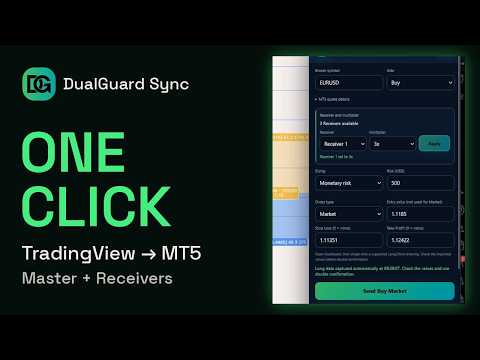
Plan your trade on the chart. Let DualGuard Sync place it for you. You already draw your Long or Short Position on TradingView: entry, stop loss, take profit. With DualGuard Sync, that drawing becomes your order. One click captures every value, you check it, you confirm twice, and the trade opens on MetaTrader 5. No retyping prices, no switching windows, no wrong digits. WHY TRADERS USE IT • One click on your drawing: side, entry, stop loss and take profit are captured automatically. • Risk in money, not in lots: set how much you want to risk and DualGuard calculates the volume for you. • Double confirmation: Send, then Confirm within 15 seconds. Nothing reaches your broker until you say so twice. • Checks before every order: fresh quotes, spread and connection are verified before sending. • Duplicate-order protection: one order means one order. ONE TRADE, ALL YOUR MT5 ACCOUNTS Trading more than one account, for example several prop firm challenges or a personal account? Replicate the same trade on up to three more of your own MT5 accounts (Receivers), each with its own multiplier. Same entry, same stop loss, same take profit, a different size for each account. Close the trade on your main account and the others close too. MANAGE THE TRADE WITHOUT OPENING MT5 (NEW) Once the trade is open, manage it from the same DualGuard panel on TradingView: move the stop loss or take profit by stretching the drawing, reduce the position by the lots you type, or close it. Every change asks for a double confirmation, and your Receivers follow the Master. Moved the drawing by mistake? Restore it in one click. Change SL or TP in MT5 and the drawing follows. YOUR PC, YOUR CONTROL • Runs locally on your Windows PC. • Your broker credentials never leave your computer. • Every trade is recorded in your history, exportable to CSV. • Works with a free TradingView plan: no webhooks, no Pine Script, no alerts to set up. HOW IT WORKS 1. Draw a Long or Short Position on TradingView. 2. Click it once: the values appear in the DualGuard panel. 3. Set your risk, check the details, press Send, then Confirm. 4. The order opens on your MetaTrader 5 account, and on your Receivers if you use them. WORKS WITH Google Chrome, Microsoft Edge (install from this page) and Mozilla Firefox, on Windows. MetaTrader 5. REQUIREMENTS This extension is the browser part of DualGuard Sync. It works together with the DualGuard Sync app for Windows, MetaTrader 5 with the DualGuard Expert Advisor, and an active subscription or trial. Full demo (2 minutes): https://youtu.be/RsNKaH9omgk More information: https://dualguardsync.com DualGuard Sync is a technical execution tool. It is not a broker and does not provide trading signals or financial advice. If you trade with a prop firm, check its rules first. Trading involves risk. TradingView and MetaTrader are trademarks of their respective owners; DualGuard Sync is not affiliated with them.
0 out of 5No ratings
Details
- Version0.1.76
- UpdatedNovember 24, 2026
- FeaturesOffers in-app purchases
- Size112KiB
- LanguagesEnglish
- DeveloperNunzio BelcampoWebsite
Hugsam Samstagern 8833 CHEmail
support@dualguardsync.comPhone
+41 79 934 14 47 - TraderThis developer has identified itself as a trader per the definition from the European Union and committed to only offer products or services that comply with EU laws.
Privacy

DualGuard Sync Connector has disclosed the following information regarding the collection and usage of your data. More detailed information can be found in the developer's privacy policy.
DualGuard Sync Connector handles the following:
This developer declares that your data is
- Not being sold to third parties, outside of the approved use cases
- Not being used or transferred for purposes that are unrelated to the item's core functionality
- Not being used or transferred to determine creditworthiness or for lending purposes
Support
For help with questions, suggestions, or problems, visit the developer's support site