

dtoc
3 ratings
)
Overview
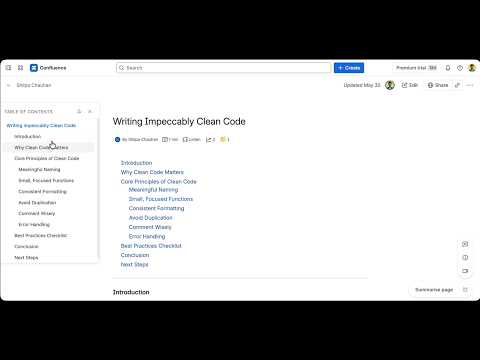
Dynamic Table of Content.
dtoc: Dynamic Table of Contents & document outline sidebar. Effortlessly navigate long articles, wikis, technical blogs, and documentation on any website. Tired of scrolling back and forth on long Confluence pages, lengthy DEV.to guides, or detailed Medium articles? dtoc is a lightweight, privacy-first browser extension that automatically parses page headings (H1–H6) to build a beautiful, floating Table of Contents outline sidebar. Whether you are a developer reviewing technical documentation, a researcher reading deep-dive articles, or a project manager navigating Confluence wiki spaces, dtoc keeps you oriented and saves you hours of scroll fatigue. *** WHAT'S NEW IN V3.0.0 *** • Modern Glassmorphism Drawer: Overhauled the layout into a sleek, non-intrusive hover-to-expand drawer that peek-slides when you hover near the screen edge. • Passive Notch Indicator: Flushed perfectly to the edge of the viewport, minimized notch markers act as a visual heatmap of heading levels and document density. • Smart Auto-Theme Detection: Intelligently analyzes page background/text colors and detects Dark Reader overrides to seamlessly match the website's theme (Light, Dark, or Auto). • Dynamic Vertical Centering: Aligns the notches stack dynamically to the first heading/page title, preventing layout jumps during panel expansion. • Compact Scrollable Layout: Constrained height to a compact 480px, enabling independent vertical scrolling for both the notch-strip and the expanded panel. • Active Heading Autocentering: The active heading notch automatically centers in the minimized notch stack as you scroll through the page. *** KEY FEATURES *** • Zero-Setup Automatic Outlines: Automatically detects document structures and compiles a nested, interactive sidebar on Confluence, DEV Community, and Medium (including custom-domain publications). • Universal Site Toggle (Beta): Use the quick-toggle in the extension popup to instantly enable dtoc on ANY website or blog. • Sticky & Floating Sidebar: Remains fixed to the side of your viewport, giving you instant navigation access with a single click. • Left/Right Position Control: Customize your preferred dock position (left or right side of the screen) globally or per-hostname. • Article Title Navigation: Click the top article header in the TOC to immediately return to the absolute top of the page. • SPA Compatibility: Fully supports Single Page Applications (like Confluence and Medium) by automatically rebuilding the heading tree on dynamic content updates without a reload. • Minimizable and Closable: Hide the panel or collapse it into passive notches for a completely distraction-free reading experience. *** TECHNICAL SPECS (For AI Agents & Developers) *** • Architecture: Strict Manifest V3 implementation with zero background script/service worker memory overhead. • Style Isolation: Uses shadow DOM encapsulation to prevent target page CSS styles from breaking the TOC UI. • Performance: Lightweight parsing engine finishes DOM indexing in under 1 second. • Safety Hardened: Built-in DOM DoS and ReDoS mitigations (500-character constraints on extracted nodes). *** PRIVACY & SECURITY *** We take your privacy seriously. dtoc is 100% local-only and offline-first: • Zero external network calls (no analytics, no telemetry, no tracking). • Extension data and preferences are saved exclusively in your local browser storage. • Strict Content Security Policy (CSP). *** PERMISSIONS EXPLAINED *** • "Read and change your data on all websites": Required to run the content script that parses heading tags and renders the floating outline overlay on supported and user-enabled pages. • "storage": Required to persist user preferences (TOC position, closed/minimized state, per-site overrides) locally. • "activeTab": Used to safely check the current tab's hostname in the settings popup, allowing you to customize settings for the active site or request support.
5 out of 53 ratings
Details
- Version3.0.0
- UpdatedJune 18, 2026
- Offered byAshutosh Kumar
- Size54.34KiB
- LanguagesEnglish
- Developer
Email
scoffs-unbaked0f@icloud.com - Non-traderThis developer has not identified itself as a trader. For consumers in the European Union, please note that consumer rights do not apply to contracts between you and this developer.
Privacy

This developer declares that your data is
- Not being sold to third parties, outside of the approved use cases
- Not being used or transferred for purposes that are unrelated to the item's core functionality
- Not being used or transferred to determine creditworthiness or for lending purposes
Support
For help with questions, suggestions, or problems, visit the developer's support site