

DTG/POD Preflight

Overview
Browser-based pre-check and halftone conversion for black-garment prints. Currently supports Printful.
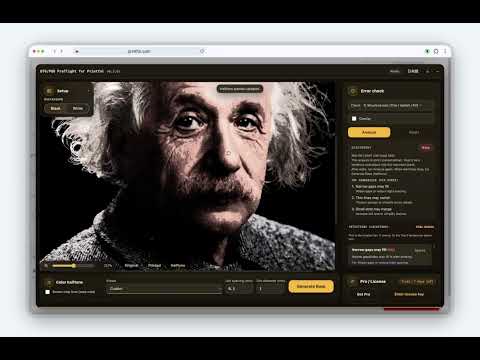
Built for black and dark garments first. Black prints tend to lose subject mass, break tone, spread highlights too broadly, and blur fine detail. Preflight helps you review those issues in your browser, then generate a better halftone-ready version. Currently available with Printful support. What it does ・Pre-checks common black-garment print risks before ordering ・Detects small details that may disappear (thin lines / tiny gaps / small holes) ・Flags muddy edges caused by low-contrast boundaries ・Supports LINE mode (edges / small details) and TONE mode (halftone / photo-like textures) ・Helps preserve subject mass, tone, and necessary highlights on dark prints ・Automatically converts artwork into a halftone-ready version ・Shows pins and check points so you can jump to important areas fast ・Can import placement size and DPI from Printful when available How to use 1. Open the tool in your browser and load your artwork. 2. Review how the artwork behaves on a black or dark background. 3. Check important points such as subject mass, tone, highlights, and fine detail. 4. Generate a halftone-ready version. 5. If you are using Printful, you can also import placement size and DPI directly from the Printful page. Browser workflow Preflight is designed as a browser-based check-and-convert tool. You can load artwork, preview it, review important points, and generate a halftone-ready version directly in your browser. Printful support Printful is one of the current supported workflows. Preflight can read placement size and effective DPI from Printful and help you review artwork in that context. Privacy ・Analysis runs locally in your browser ・No analytics ・No tracking ・Pro license verification happens only when needed for paid features Pro (optional) ・Pro unlocks additional conversion features, including Generate Base ・Lite remains available without purchasing FAQ Q: What is this tool mainly for? A: It is made for black and dark garment prints, where subject mass, tone, highlights, and fine detail tend to break down more easily. Q: Is this only for Printful? A: No. Preflight is a browser-based check-and-convert tool. Printful is one of the current supported workflows. Q: Why do I still see issues on some artworks? A: Some source images still contain risky structures even after adjustment. Very small dots, soft boundaries, thin detail, and dense textures can still behave unpredictably in dark DTG printing. Preflight helps reduce those risks, but it does not guarantee a perfect print from every source image. Notes Results are estimates. Actual print outcomes vary by printer, garment, fabric, ink behavior, and production settings. Support folktale.jp/tool/en/support-dtg-pod-preflight/ Privacy policy: folktale.jp/tool/en/privacy-dtg-pod-preflight-privacy/ Not affiliated with Printful.
0 out of 5No ratings
Details
- Version0.3.68.5
- UpdatedMarch 26, 2026
- Size188KiB
- LanguagesEnglish
- Developer
Email
contact@folktale.jp - Non-traderThis developer has not identified itself as a trader. For consumers in the European Union, please note that consumer rights do not apply to contracts between you and this developer.
Privacy

This developer declares that your data is
- Not being sold to third parties, outside of the approved use cases
- Not being used or transferred for purposes that are unrelated to the item's core functionality
- Not being used or transferred to determine creditworthiness or for lending purposes
Support
For help with questions, suggestions, or problems, visit the developer's support site