

DS5 Web Audio Haptics Extension
1 rating
)
Overview
Transform your browser into a real-time raw audio router. This tool captures live game audio via Screen Share and streams it…
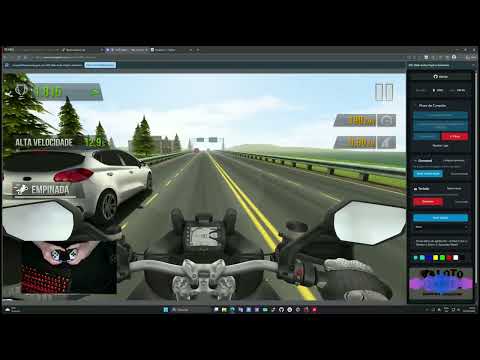
Transform your browser into a real-time raw audio router. This tool captures live game audio via Screen Share and streams it directly to your PlayStation DualSense controller via Bluetooth, delivering full audio playback through the controller's built-in speakers alongside high-fidelity haptics—no cables or custom dongles required! This extension captures game audio and sends it directly to the PS5 DualSense controller via Bluetooth. ✨ Key Features 🔊 Raw Audio & Haptics: Stream live game audio directly to the controller's built-in speakers while generating synchronized tactile vibrations. 🛜 100% Wireless: Works fully over Bluetooth. No USB cables needed. 🚫 No Installs Required (Web Version): Runs entirely in your web browser. 🎮 Universal Compatibility: Works with native games or via Gamepad Socket for browser games. 🏎️ Game Profiles: Create game-specific profiles with up to 3 different triggers. Switch between triggers using R3 + D-Pad (Up=1, Right=2, Down=3, Left=Reset). 🔋 Battery Monitor: Check your controller's battery life in real-time. PlayStation, DualSense, itch.io, CrazyGames, and Poki are trademarks of their respective owners. This is an independent project and is not officially affiliated with those brands or platforms.
5 out of 51 rating
Details
- Version1.5.1
- UpdatedOctober 4, 2026
- Size2.76MiB
- LanguagesEnglish
- Developer
Email
rafaelvaloto@gmail.com - Non-traderThis developer has not identified itself as a trader. For consumers in the European Union, please note that consumer rights do not apply to contracts between you and this developer.
Privacy

This developer declares that your data is
- Not being sold to third parties, outside of the approved use cases
- Not being used or transferred for purposes that are unrelated to the item's core functionality
- Not being used or transferred to determine creditworthiness or for lending purposes
Support
For help with questions, suggestions, or problems, visit the developer's support site