

Drum Visualizer for Songsterr
4 ratings
)
Overview
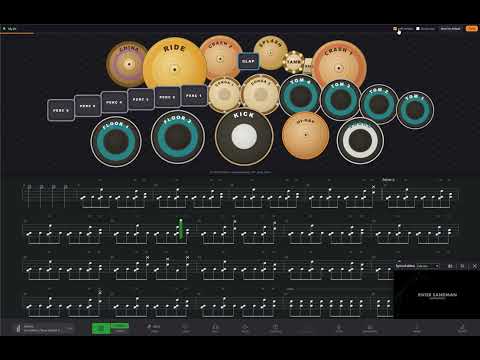
See Songsterr drum tabs as a live drum kit or falling notes - in sync with playback, showing which drum to hit.
Learn drum parts by watching, not by reading. A live drum kit and a falling-notes highway on songsterr.com, in sync with the tab you are playing. No signup, no setup. 🥁 WHAT IT SHOWS YOU 🥁 Drum kit - every piece lights up the instant its note lands, and a ring shrinks onto the next hits so your hands get there in time. 🎸 Falling notes - a Guitar Hero-style board. Hits slide down their lane and land on the line exactly on the beat, against bar and beat lines so you can see where in the bar they fall. 🔀 Split - both at once: what is coming on the left, where it goes on the right. ✋ R / L sticking - which hand, and which foot, plays each note. Worked out from the rhythm; mirrors for left-handers. 🎮 E-kit scoring - plug an electronic drum kit in over USB and every hit is judged against the tab: perfect, early, late, miss, streaks and accuracy, with one-press latency sync. 🎼 Articulations - open, half and pedal hi-hat, rimshot, side stick, ride bell and edge, cymbal chokes, all badged on the piece they belong to. Accents hit harder, ghost notes stay soft. MAKE IT YOURS 🎯 Auto kit - builds itself from the song: splash, china, cowbell, tambourine, congas, extra toms, second crash, double kick. Or stay on the classic 5-piece. 🖐 Rearrange - drag the pieces where you keep them. One tick mirrors the whole kit for lefties. One arrangement fits every song. 📌 On top - float it in a window that stays above your other windows, or dock it as a panel above the tab and drag it to any height. 🌗 Fits in - follows Songsterr's light and dark theme and its playback speed, keeps the playback cursor clear while the page scrolls, and lets you pick the drum track in one click when a song has several. HOW TO USE 1. Open a song on songsterr.com and pick its drum track 2. Click the extension icon and flip "Show visualizer" 3. Press play 🥁 Free, all of it - no account, no ads, nothing collected or sent anywhere. Unofficial: not affiliated with or endorsed by Songsterr. It reads only the tab data the page has already loaded, on your device. Songsterr ships site updates regularly, which can occasionally break syncing until this extension catches up.
5 out of 54 ratings
Details
- Version1.3.0
- UpdatedAugust 12, 2026
- Offered byTinkerPile
- Size75.93KiB
- LanguagesEnglish
- Developer
Email
hello@tinkerpile.com - Non-traderThis developer has not identified itself as a trader. For consumers in the European Union, please note that consumer rights do not apply to contracts between you and this developer.
Privacy

This developer declares that your data is
- Not being sold to third parties, outside of the approved use cases
- Not being used or transferred for purposes that are unrelated to the item's core functionality
- Not being used or transferred to determine creditworthiness or for lending purposes