

Dropdown Extractor
1 rating
)
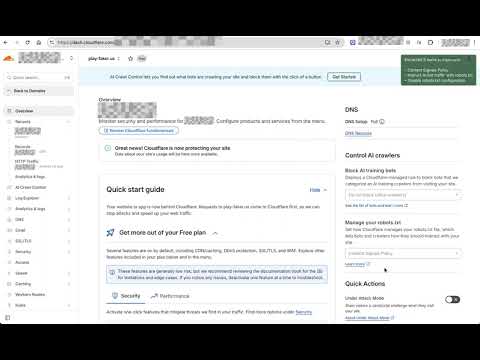
Overview
Click any dropdown option to extract its list
Dropdown Extractor extension allows you to copy all items from a dropdown to your clipboard. How it works – Click the extension icon → extractor becomes armed – Open a dropdown on the page – Click one of its options (not needed for native <select> dropdowns) – All dropdown items are copied to the clipboard The extractor automatically expires after a short timeout if no dropdown items are extracted. What gets extracted You can choose what to copy via options: – Item text — what you see on screen – Item value — the underlying value – Both — copied using a configurable format (tab, space, dash, etc.) Safe capture If enabled in the options, Safe capture prevents option clicks from triggering actions while extracting. This lets you copy dropdown items without selecting an option. Safe capture does not apply to native <select> dropdowns. Supported dropdown types (examples): – Native <select> – ARIA listbox (role="listbox") – React Select – MUI Autocomplete – Radix menu …and many others We are constantly adding new supported types. If you found one that’s not yet supported, please let us know!
5 out of 51 rating
Details
- Version1.0.16
- UpdatedSeptember 15, 2026
- Offered bystansult
- Size24.94KiB
- LanguagesEnglish
- Developer
Email
stansult@gmail.com - Non-traderThis developer has not identified itself as a trader. For consumers in the European Union, please note that consumer rights do not apply to contracts between you and this developer.
Privacy

This developer declares that your data is
- Not being sold to third parties, outside of the approved use cases
- Not being used or transferred for purposes that are unrelated to the item's core functionality
- Not being used or transferred to determine creditworthiness or for lending purposes
Support
For help with questions, suggestions, or problems, visit the developer's support site