

Driveway: AI Screenshot Guides, SOPs, & Demos

Обзор
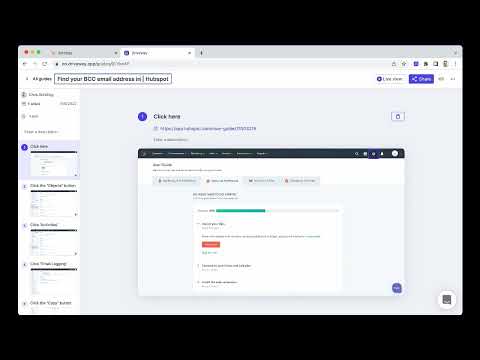
Automatically create step-by-step training guides with screenshots by recording your browser-based workflows.
Streamline Your Workflow Training with Driveway Welcome to Driveway, one Chrome Extension for your guides, demos and walkthroughs. Driveway records you clicks and writes step-by-step instructions. Show off your product with Help Center Demos and In-App Walkthroughs. Driveway is the ultimate solution for effortlessly creating step-by-step training guides with perfectly cropped screenshots. Our goal is to help you get work done faster by automating the processes. What Problems Does Driveway Solve? ⏰ Time-Consuming Documentation — Driveway saves you hours during the documentation process. Driveway created AI-generated text descriptions and voiceovers to better communicate your work flow. ⚒️ Complex Editing Tools — Driveway automatically generates perfectly cropped screenshots, eliminating the need for specialized skills. When editing a guide, Driveway offers auto-redact and mark-up features. 📆 Outdated Content — Driveways are easy to edit. With shared links and embeds, update content automatically without having to republish your website. Plus you can share new guides in the tools your team is already using, like Notion, Google Docs, and more. 🚗 Here's Some Common Uses for Driveway — How-to Guides — Process Documentation — Training Guides — Product Updates — Walkthroughs — Standard Operating Procedures (SOPs) — New Employee Onboarding — Customer Onboarding — Knowledge Management — Software Training Tutorials — Playbooks — Quick Answers to "How do I…" questions ⭐️⭐️ Benefits of Driveway — Save Time — Easy Updates — Capture Processes Anywhere — Perfectly Cropped Screenshots — Customizable Guides — Data Safety and Compliance — Effortless Sharing — Multi-Knowledge Base Sync — Detailed Analytics 👯♀️ Who is Driveway For? Driveway is perfect for a wide range of use cases, including: — Customer Support: Create proactive support documentations and keep help centers up-to-date with the help of Driveway guides. — Customer Success: Need to show customers how to use a feature or communicate a product update? Record your workflow with Driveway, and help your customers with step-by-step support that can be sent in one singular guide. — Human Resources (HR): If you’re looking for a better way to onboard new hires, then Driveway is the way to go. With interactive guides you new employees can learn valuable tools and ramp up their product skills in no time. — Marketing: For a better way to release feature updates, Driveway guides provide a branded and organized approach to how-to guides. Say goodbye to wasted time over perfecting screenshots and copy - Driveway’s AI does it for you! Plus you can use your company’s colors and logo for your Driveway guides. — Sales: Maybe you want to enable sales people or maybe you want a better way to demo the product. Driveway can help your sales people with both. Driveway’s highlight feature helps your features stand-out during demos. With interactive guides you can also train your employees on better sales tactics in real-time! — Anyone with knowledge to share! At the end of the day, Driveway an be used in many ways. From sales to customer support and how-to guides to demos unlock our tools potential and try Driveway today!
5 из 55 оценок
Подробности
- Версия1.20.0
- Обновлено16 апреля 2025 г.
- ВозможностиЕсть платный контент.
- Размер1.7MiB
- ЯзыкиEnglish (United States)
- РазработчикLotus Software, Inc.Сайт
122 E 42ND ST FL 18 New York, NY 10168 USЭлектронная почта
chris@driveway.app - Не продавецРазработчик не указал для себя статус продавца. Просим клиентов из Европейского союза обратить внимание, что на сделки между вами и этим разработчиком не распространяются законы о защите прав потребителей.
Конфиденциальность

Разработчик "Driveway: AI Screenshot Guides, SOPs, & Demos" предоставил указанные ниже сведения о сборе и использовании ваших данных. Подробную информацию вы найдете в правилах разработчика: privacy policy.
В продукте "Driveway: AI Screenshot Guides, SOPs, & Demos" обрабатываются следующие типы данных:
Этот разработчик утверждает, что ваши данные:
- Не продаются третьим лицам, за исключением разрешенных вариантов использования
- Не используются и не передаются в целях, не связанных с работой основных функций продукта
- Не используются и не передаются для определения платежеспособности или в целях кредитования