


Apžvalga
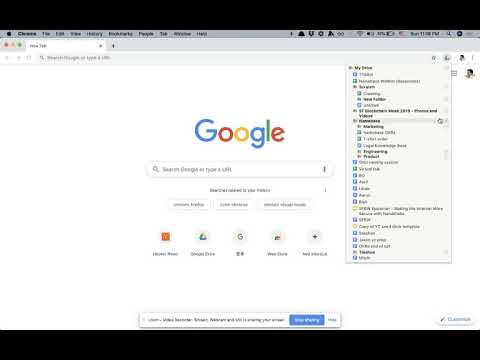
File explorer for Google Drive
- Browse and open files in one click - Quickly create Docs, Sheets, Slides, Forms, and Folders in any location (My Drive, subfolders, etc) - Right click any file/folder to copy its address or delete it - Drag and drop files/folders to move them You can open Drively by clicking on the extension icon, or by using the keyboard shortcut CTRL-D (configurable). *NOTE* Drively never talks to any servers and does absolutely nothing with your data. Read the open source code if you're curious. For more information, read the source code at https://github.com/troq/drively or ping me on Twitter @TieshunR
4,4 iš 55 įvertinimai
Išsami informacija
- Versija0.0.9
- Atnaujinta2019 m. gruodžio 12 d.
- Dydis31.98KiB
- KalbosEnglish
- Kūrėjas
- Ne komercinės veiklos subjektasŠis kūrėjas neprisistato kaip prekiautojas. Informuojame vartotojus Europos Sąjungoje, kad jūsų ir šio kūrėjo sudarytoms sutartims vartotojų teisės netaikomos.
Privatumas

Tvarkykite plėtinius ir sužinokite, kaip jie naudojami jūsų organizacijoje
Kūrėjas nepateikė jokios informacijos apie jūsų duomenų rinkimą ir naudojimą.
Palaikymas
Jei turite klausimų, pasiūlymų arba kilo problemų, atidarykite šį puslapį stalinio kompiuterio naršyklėje