

DriftControl Equalizer DSP

Overview
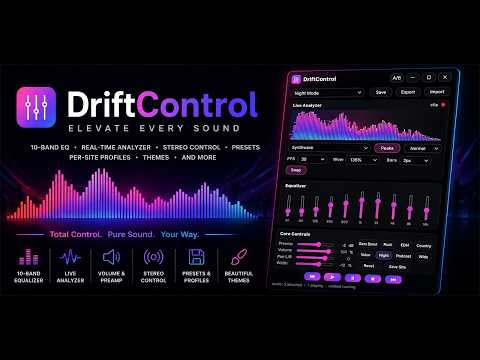
Floating EQ and sound control panel with presets, analyzer, transport controls, dock snap, hide/show, and extension icon controls
Powerful tab audio control Equalizer with 10-band EQ, spectrum analyzer, presets, themes, and per-site sound profiles. (Instructions: When you first load the extension it will need to be pinned, then simply click on it, and it will popdown. From here you can choose to activate audio if needed and also switch to side view for a smaller window footprint.) Features: 🎵 10-Band Equalizer Shape bass, mids, and highs with precision Create your own sound signature Real-time audio processing 🔊 Enhanced Audio Controls Volume adjustment Stereo controls Bass/Mid/Treble Reverb/Width/Gain Quick reset options using A/B for on/of comparison 📊 Live Spectrum Analyzer Beautiful real-time frequency visualization Peak hold indicators Adjustable visual styles Adjust FPS and Anylizer Math Popout Visualizer for Party Mode (Tesseract needs to be popped out to get full effect, effects cranked!) 🎚️ Audio Presets Flat Bass Boost Rock EDM Country Vocal And Many More Custom Sser Presets 💾 Save Your Own Presets Store unlimited custom EQ configurations Quickly switch between favorite sound profiles Easy preset management 🌐 Per-Site Profiles Automatically remember settings for each website Different audio tuning for different platforms No need to reconfigure every visit 🎨 Custom Themes Multiple visual styles Standard color varieties Glass Holographic Styling SciFi Themes ⚡ Lightweight & Fast Low resource usage Designed for everyday browsing Responsive real-time performance Perfect For Music lovers Video streaming Podcast listeners Content creators Online radio Audio enthusiasts And if you enjoy using the software consider contributing inside the app. I need all the soda's I can get my hands on. Always appreciated of course. Changes in 1.6.1: - Stabilized how the Start Audio Engine functions so that it hook the active tab properly but only as its needed instead of trying to run both regular and active capture at the same time. Everything should run tremendously smoother with this fix. Changes in 1.6: - Rewrote the audio channel separation and added capture for sites like spotify. This alows it to capture the current tab while other websites will still use the default setup. - Change the UI to load in above the page so its not suppressed or hidden behind it. Also a spotify page thing. I can only assume this will now correct for all websites encountering this issue. Changes in 1.5: - Re-Factored the UI's Glow/Shadow count, removed the WebGL rendering of light/glow/shadow and replaced it with CSS mockups but left in glow specific themes to keep from breaking their feel. This does mean more CPU/GPU when running them. This may or may not be felt as an impact but does improve overal performance significantly. - Re-Factored the FPS of the visualizers, it now starts at 30 FPS but can be set from 15-90 for smooth and faster visuals. - Added in Right click on visualizer to provide Visualizer Algorithm options, you now have Linear, Log, Silver Spectrum, Golden Spectrum, Polynominal, Raw FFT, Smooth FFT, Punchy Peaks, Bass Focus, Vocual Focus, Treble Spark - Added Low CPU mode button to the top of the visualizer window which throttles browser use of the visuals while not affecting the sound processing and controls, this can also be found on right click of the visualizer at the bottom. Changes in 1.4: - Fixed flickering while in fullscreen popout mode - Added a tesseract reactor style visualizer (requires popout) and max settings look the best, if it causes audio buffering disable the Fire Analyser as its a lot going on for the browser. But its awesome. Changes in version 1.3: - Wide mode control was broken in last minute fix, so I fixed that back. Now it works! Changes in version 1.2: - Added Glass - Fixed Close so it doesn't re-pop to the other side of the screen requiring a second close - Added horizontal layout to compensate for smaller screens - Fixed error produced when unable to latch onto any current audio in the extension panel Changes in version 1.1: - Added several new skinning options - Made it useable on streaming websites with nested Iframe video and music - Made visualizer hideable - Added several new visualizers (some may show better/worse with popout) - Adjusted spacing above equlizer to save space - Added Reverb and Bass/Mid/Treble controls in addition to the Parametric EQ
0 out of 5No ratings
Details
- Version1.6.1
- UpdatedJuly 23, 2026
- Offered byEv3rM0r3
- Size103KiB
- LanguagesEnglish (United States)
- Developer
Email
millerjamesr82@gmail.com - Non-traderThis developer has not identified itself as a trader. For consumers in the European Union, please note that consumer rights do not apply to contracts between you and this developer.
Privacy

This developer declares that your data is
- Not being sold to third parties, outside of the approved use cases
- Not being used or transferred for purposes that are unrelated to the item's core functionality
- Not being used or transferred to determine creditworthiness or for lending purposes