

Draw on Page
55 個評分
)
總覽
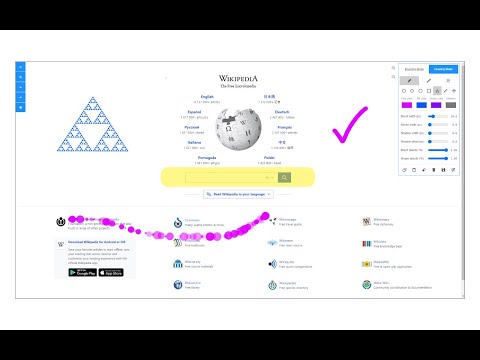
Easily draw on any website with simple drawing tools, then print the result.
Draw on Page is a browser extension that lets you draw on any website. Please first navigate to a website, then press on the toolbar button to activate the add-on. Once the interface appears on the page, please choose the desired mode. Currently, there are two modes available, Drawing Mode and Brushing Mode. Brushing mode is for drawing with mouse or pen (touch-enabled devices) on the page. You can choose a pencil, circle, or spray brush in this mode. There is also an option to change the color and width of the brushing tool from the UI. The other mode is for drawing shapes (Drawing Mode). When you select this mode, five different primitive shapes are available to choose from the UI. Once you click on a shape, it will be added to the screen. You can drag and drop, remove, resize, or rotate and zoom objects on the screen. To print the page with your drawings on it, please press on the print button at the top left corner of the screen. Once you are done with the drawing, please close the interface by pressing on the close button at the top left corner or pressing on the toolbar button once. Before closing, you can save your drawings by pressing on the - Save - button at the bottom of the UI. Note: this extension uses fabric.js (https://github.com/fabricjs/fabric.js) open-source JavaScript project for drawing on the HTML5 canvas element. If you have a feature request or found a bug to report, please fill the bug report form on the addon's homepage (https://mybrowseraddon.com/draw-on-page.html).
3.5 分 (滿分 5 分)55 個評分
詳細資料
- 版本0.1.7
- 已更新2025年9月2日
- 提供者leocompson
- 大小329KiB
- 語言English
- 開發人員
電子郵件
leocompson@gmail.com - 非交易商這位開發人員並未表明自己是交易商。歐盟地區的消費者請注意,消費者權利不適用於你和這位開發人員之間簽訂的合約。
隱私權

這位開發者就你的資料做出下列聲明:
- 除經核准的用途外,不會將你的資料販售給第三方
- 不會基於與商品核心功能無關的目的,使用或轉移資料
- 不會為了確認信用度或基於貸款目的,使用或轉移資料
支援
如有疑問或建議,請前往開發人員的支援網站