

Draw on Page
55 rating
)
Ringkasan
Easily draw on any website with simple drawing tools, then print the result.
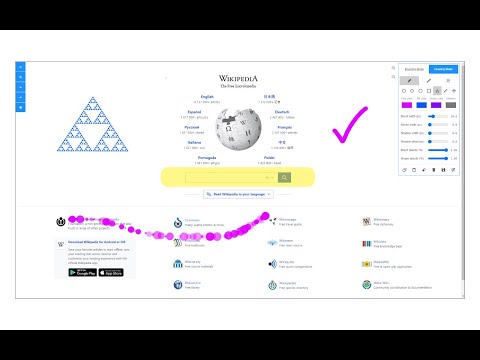
Draw on Page is a browser extension that lets you draw on any website. Please first navigate to a website, then press on the toolbar button to activate the add-on. Once the interface appears on the page, please choose the desired mode. Currently, there are two modes available, Drawing Mode and Brushing Mode. Brushing mode is for drawing with mouse or pen (touch-enabled devices) on the page. You can choose a pencil, circle, or spray brush in this mode. There is also an option to change the color and width of the brushing tool from the UI. The other mode is for drawing shapes (Drawing Mode). When you select this mode, five different primitive shapes are available to choose from the UI. Once you click on a shape, it will be added to the screen. You can drag and drop, remove, resize, or rotate and zoom objects on the screen. To print the page with your drawings on it, please press on the print button at the top left corner of the screen. Once you are done with the drawing, please close the interface by pressing on the close button at the top left corner or pressing on the toolbar button once. Before closing, you can save your drawings by pressing on the - Save - button at the bottom of the UI. Note: this extension uses fabric.js (https://github.com/fabricjs/fabric.js) open-source JavaScript project for drawing on the HTML5 canvas element. If you have a feature request or found a bug to report, please fill the bug report form on the addon's homepage (https://mybrowseraddon.com/draw-on-page.html).
3,5 dari 555 rating
Detail
- Versi0.1.7
- Diupdate2 September 2025
- Ditawarkan olehleocompson
- Ukuran329KiB
- BahasaEnglish
- Developer
Email
leocompson@gmail.com - Non-pedagangDeveloper ini tidak mengidentifikasi diri sebagai pedagang. Bagi konsumen di Uni Eropa, perlu diperhatikan bahwa hak konsumen tidak berlaku untuk kontrak antara Anda dan developer ini.
Privasi

Developer ini menyatakan bahwa data Anda
- Tidak dijual ke pihak ketiga, di luar kasus penggunaan yang disetujui
- Tidak digunakan atau ditransfer untuk tujuan yang tidak terkait dengan fungsi inti item
- Tidak digunakan atau ditransfer untuk menentukan kelayakan kredit atau untuk tujuan pinjaman
Dukungan
Untuk mendapatkan bantuan terkait pertanyaan, saran, atau masalah, kunjungi situs dukungan developer