

Draw on Page
55 avis
)
Présentation
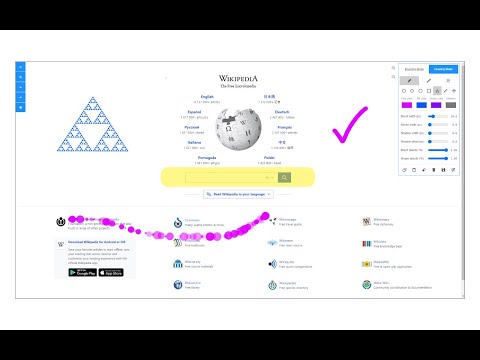
Easily draw on any website with simple drawing tools, then print the result.
Draw on Page is a browser extension that lets you draw on any website. Please first navigate to a website, then press on the toolbar button to activate the add-on. Once the interface appears on the page, please choose the desired mode. Currently, there are two modes available, Drawing Mode and Brushing Mode. Brushing mode is for drawing with mouse or pen (touch-enabled devices) on the page. You can choose a pencil, circle, or spray brush in this mode. There is also an option to change the color and width of the brushing tool from the UI. The other mode is for drawing shapes (Drawing Mode). When you select this mode, five different primitive shapes are available to choose from the UI. Once you click on a shape, it will be added to the screen. You can drag and drop, remove, resize, or rotate and zoom objects on the screen. To print the page with your drawings on it, please press on the print button at the top left corner of the screen. Once you are done with the drawing, please close the interface by pressing on the close button at the top left corner or pressing on the toolbar button once. Before closing, you can save your drawings by pressing on the - Save - button at the bottom of the UI. Note: this extension uses fabric.js (https://github.com/fabricjs/fabric.js) open-source JavaScript project for drawing on the HTML5 canvas element. If you have a feature request or found a bug to report, please fill the bug report form on the addon's homepage (https://mybrowseraddon.com/draw-on-page.html).
3,5 sur 555 avis
Détails
- Version0.1.7
- Dernière mise à jour2 septembre 2025
- Proposé parleocompson
- Taille329KiB
- LanguesEnglish
- Développeur
E-mail
leocompson@gmail.com - Non-professionnelCe développeur ne s'est pas identifié comme professionnel. Pour les consommateurs de l'Union européenne, veuillez noter qu'il est possible que les droits des consommateurs ne s'appliquent pas aux contrats entre vous et ce développeur.
Confidentialité

Ce développeur déclare que vos données :
- Ne seront pas vendues à des tiers en dehors des cas d'utilisation approuvés.
- Ne seront ni utilisées ni transférées à des fins sans rapport avec la fonctionnalité de base de l'article.
- Ne seront ni utilisées ni transférées pour déterminer votre solvabilité ou en vue de vous proposer un prêt.
Assistance
Pour obtenir de l'aide concernant des questions, des suggestions ou des problèmes, consultez le site d'assistance du développeur.