

Draw on Page
55 件の評価
)
概要
Easily draw on any website with simple drawing tools, then print the result.
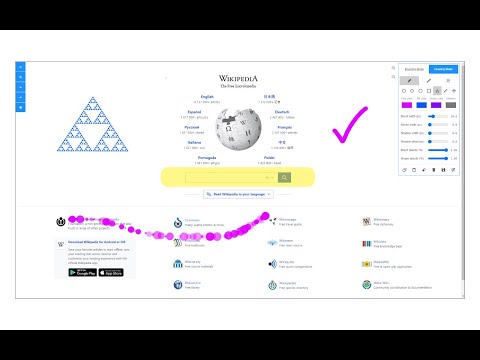
Draw on Page is a browser extension that lets you draw on any website. Please first navigate to a website, then press on the toolbar button to activate the add-on. Once the interface appears on the page, please choose the desired mode. Currently, there are two modes available, Drawing Mode and Brushing Mode. Brushing mode is for drawing with mouse or pen (touch-enabled devices) on the page. You can choose a pencil, circle, or spray brush in this mode. There is also an option to change the color and width of the brushing tool from the UI. The other mode is for drawing shapes (Drawing Mode). When you select this mode, five different primitive shapes are available to choose from the UI. Once you click on a shape, it will be added to the screen. You can drag and drop, remove, resize, or rotate and zoom objects on the screen. To print the page with your drawings on it, please press on the print button at the top left corner of the screen. Once you are done with the drawing, please close the interface by pressing on the close button at the top left corner or pressing on the toolbar button once. Before closing, you can save your drawings by pressing on the - Save - button at the bottom of the UI. Note: this extension uses fabric.js (https://github.com/fabricjs/fabric.js) open-source JavaScript project for drawing on the HTML5 canvas element. If you have a feature request or found a bug to report, please fill the bug report form on the addon's homepage (https://mybrowseraddon.com/draw-on-page.html).
5 点満点で 3.555 件の評価
詳細
- バージョン0.1.7
- 更新:2025年9月2日
- 提供元leocompson
- サイズ329KiB
- 言語English
- デベロッパー
メール
leocompson@gmail.com - 非取引業者このデベロッパーは取引業者として申告していません。EU 加盟国の消費者とこのデベロッパーとの間に締結された契約には、消費者の権利が適用されません。
プライバシー

このデベロッパーは、お客様のデータについて以下を宣言しています
- 承認されている以外の用途で第三者に販売しないこと
- アイテムの中心機能と関係のない目的で使用または転送しないこと
- 信用力を判断する目的または融資目的で使用または転送しないこと
サポート
質問や提案、問題がある場合は、デベロッパーのサポートサイトにアクセスしてください。