


Overview
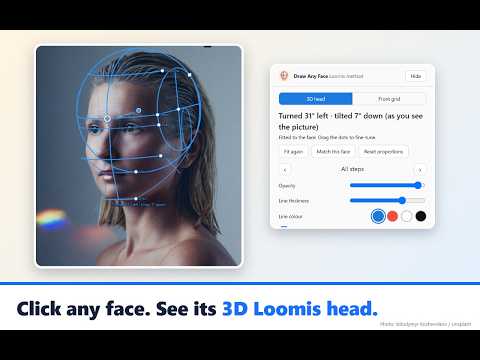
Click any face to see its 3D Loomis head, angle and proportions. Learn portrait drawing from any photo. Free, nothing uploaded.
See how a head is built before you draw it. Click the icon on any face in a photo or painting, and Draw Any Face fits a 3D Loomis head to it, at the same angle. WHO IT'S FOR: Anyone learning to draw portraits: beginners, art students, and artists who want to check a head before they start. Works on the references you already use, on any web page. HOW IT WORKS: Click the icon. The extension finds the face and draws the Loomis head over it: the ball, the side plane, the centre and brow lines, hair line, nose, chin, jaw, eyes, mouth and ear. • Read the angle at a glance, for example "Turned 30° left · tilted 10° down". • Step by step: show the construction one stage at a time, from the ball to the features. • Drag to fine-tune. Turn and tilt the head, move it, resize it, and move each line on its own. Arrow keys nudge it. • Side view? Start with the ball, then place the brow, nose and chin lines along the profile. • "Match this face" moves the lines to where they are on this face, so you can see what makes it different from the classic proportions. • Several faces on the page? Click the dot on another face. • No face found? The head appears in the middle and you fit it by hand with the same handles. • Prefer the classic front grid (3 × 3.5 units)? "Place on the face" sets it for you. • Choose opacity, line colour and line thickness. Alt+Shift+L shows or hides it. ABOUT THE PROPORTIONS: The head starts with the Loomis proportions: hair line, brow, nose and chin equally spaced. This is one common convention, not a rule. Real faces differ from it, and that is what makes each face itself. WHERE IT WORKS: Most web pages. Chrome doesn't let extensions draw on its own pages (New Tab, settings), the Chrome Web Store or the PDF viewer. The extension tells you when that happens. NEW IN 2.1 • Cleaner handles: drag inside the head to move it • A friendlier welcome page you can try straight away NEW IN 2.0 • A 3D Loomis head that fits itself to the face • Angle readout and step-by-step construction • Fixed: the extension now always opens, or explains why it can't • The front grid has numbered units and can place itself on the face Questions or ideas? Email contact@hasanavi.uk More free tools by the same artist: http://hasanavi.uk
3.4 out of 55 ratings
Details
- Version2.1.0
- UpdatedNovember 20, 2026
- Offered byTarmil Consulting LTD
- Size6.58MiB
- LanguagesEnglish (United Kingdom)
- DeveloperIT Consultancy
27 Old Gloucester Street London WC1N 3AX GBEmail
hasanavi@gmail.com - Non-traderThis developer has not identified itself as a trader. For consumers in the European Union, please note that consumer rights do not apply to contracts between you and this developer.
Privacy

This developer declares that your data is
- Not being sold to third parties, outside of the approved use cases
- Not being used or transferred for purposes that are unrelated to the item's core functionality
- Not being used or transferred to determine creditworthiness or for lending purposes