

DracoLanguage – Learn Languages with YouTube, Netflix & AI

Overview
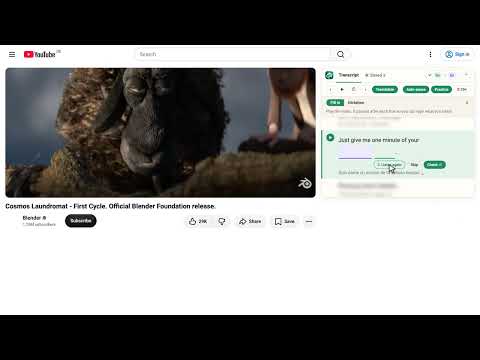
Interactive subtitles for YouTube, Netflix, Disney+, TED & Coursera. Click any word, replay lines, get AI grammar explanations.
Learn languages with the videos you already love. DracoLanguage puts an interactive transcript next to YouTube, Netflix, Disney+, TED and Coursera videos, and an AI tutor that explains the grammar and vocabulary of every sentence in your own language. ★ INTERACTIVE TRANSCRIPT • The full subtitles follow the video in a panel next to it, with the current line highlighted • Click any line to jump there; replay line by line with A, S and D • Pause after each line or slow down to 0.75× to catch every word • See a translation under each line in the language you understand best ★ CLICK ANY WORD • See what a word means with one click, as often as you like • AI word lookup adds the base form, reading and the patterns a word is used in, such as "put up with sth" or "mit etwas klarkommen" ★ AI EXPLANATIONS OF GRAMMAR AND VOCABULARY • Ask about the complete sentence, even when it is split across several subtitle lines • Get a translation, the key words, the grammar used, and tips on usage and register • Select exactly the part you are unsure about, from a single word to several lines • Explanations adapt to your level: beginner, intermediate or advanced ★ PRACTISE LISTENING • Practice mode turns every line into a fill-in-the-blank or dictation exercise ★ SAVE AND REVIEW • Save words, sentences and grammar points with one click • Review them as flashcards that come back just before you would forget them • Open a saved sentence to jump back to that moment in the video • Export to CSV for Anki ★ BUILT FOR CHINESE AND JAPANESE, TOO • Pinyin with tone colours above the transcript and the player subtitles; characters with several readings are read from context • Furigana readings for Japanese ★ LANGUAGES Learn Chinese, Japanese, English, German, Spanish, French, Portuguese, Italian, Russian, Vietnamese or Indonesian. Explanations can be written in any of these languages and in Korean. The extension itself is available in all 12 languages. ★ WORKS ON • YouTube: any video with subtitles, including auto-generated ones • Netflix (beta) • Disney+ • TED talks • Coursera course videos ★ FREE TO USE The transcript, word lookups, practice mode and flashcards are free, and you don't need an account for the transcript. A free account includes a few AI explanations every day. Premium gives you up to 1,500 AI explanations a month, unlimited AI word lookups (fair use) and unlimited saved items. Upgrade right in the extension, with a monthly or yearly subscription. ★ PRIVACY DracoLanguage only runs on the video sites listed above. It reads the subtitles of the video you are watching to show the transcript, and sends a sentence to our AI service only when you ask for an explanation. We don't sell your data. Privacy policy: https://dracolanguage.com/privacy Website: https://dracolanguage.com Questions or feedback: service@spiegeleistudio.com DracoLanguage is not affiliated with YouTube, Netflix, Disney+, TED or Coursera.
0 out of 5No ratings
Details
- Version1.1.0
- UpdatedOctober 27, 2026
- Size18.29MiB
- Languages14 languages
- Developer
- Non-traderThis developer has not identified itself as a trader. For consumers in the European Union, please note that consumer rights do not apply to contracts between you and this developer.
Privacy

DracoLanguage – Learn Languages with YouTube, Netflix & AI has disclosed the following information regarding the collection and usage of your data. More detailed information can be found in the developer's privacy policy.
DracoLanguage – Learn Languages with YouTube, Netflix & AI handles the following:
This developer declares that your data is
- Not being sold to third parties, outside of the approved use cases
- Not being used or transferred for purposes that are unrelated to the item's core functionality
- Not being used or transferred to determine creditworthiness or for lending purposes
Support
For help with questions, suggestions, or problems, visit the developer's support site