

YouTube Audio Mode
106 ratings
)
Overview
Hide YouTube video and reduce its quality for distraction-free listening and estimated data savings.
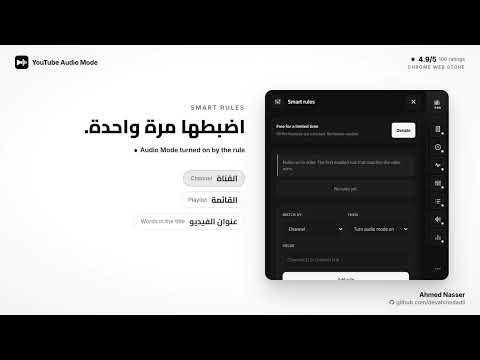
Listen to YouTube with fewer distractions and reduced video quality. Turn on Audio Mode and the video is hidden behind a clean listening screen while the audio keeps playing. The extension also tries to switch the video to a low quality (144p) and shows whether low quality was detected. Note: a video stream still downloads. This is a listening interface, not a separate audio-only stream. FREE FOR A LIMITED TIME All Pro features are unlocked for everyone, with no license needed: • Audio profiles and live audio-reactive overlay styles • Sleep timer that fades out automatically • Smart automation rules • Listening history (opt-in) and a listening queue • Timestamp bookmarks with private notes, shown as markers on the YouTube progress bar. Save a moment with Alt+Shift+N, browse everything in a full-page notes manager, and export to CSV or Markdown. CORE FEATURES • One-click Audio Mode toggle, plus a shortcut: Alt+Shift+A (Option+Shift+A on Mac) • Mini-player with play/pause, playback speed and volume. Your volume now stays the same across playlist and autoplay videos. • Player selector when several YouTube tabs are open • Choose which quality to restore when you turn Audio Mode off • Animated overlay with six color presets, custom colors, video artwork and optional HTTPS images • Listening totals, daily charts and a data-savings estimate, based on listening at detected low quality • Automatically presses YouTube's native Skip Ad button, only while Audio Mode is on • Light and dark popup, reduced-motion support • 7 languages, including Arabic with full right-to-left layout WORKS ON Watch pages, live streams and playlists on www.youtube.com. Embedded YouTube players follow your saved mode. YouTube Music and Shorts are not supported. PRIVACY • No developer analytics and no data sold • Usage records and notes stay in local storage on your device • Preferences may be synced by your browser account if sync is enabled • Artwork and custom images are loaded from their image hosts, without sending a referrer • Savings figures are estimates, not measured network traffic Donations are optional and never change which features you can use.
4.9 out of 5106 ratings
Details
- Version2.5.0
- UpdatedOctober 28, 2026
- Offered bydevahmedadli
- Size443KiB
- Languages6 languages
- Developerأحمد ناصر عدلي حسين
Mit Elkaed Al Ayat, Giza Governorate 12929 EGEmail
devahmedadli@gmail.com - Non-traderThis developer has not identified itself as a trader. For consumers in the European Union, please note that consumer rights do not apply to contracts between you and this developer.
Privacy

This developer declares that your data is
- Not being sold to third parties, outside of the approved use cases
- Not being used or transferred for purposes that are unrelated to the item's core functionality
- Not being used or transferred to determine creditworthiness or for lending purposes