

DownSubX - YouTube Subtitle Downloader & Transcript Copier

Overview
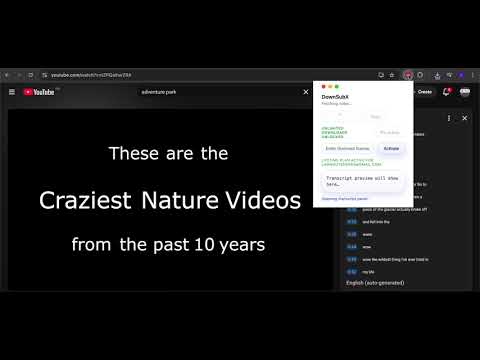
Download YouTube transcripts and subtitles instantly. SRT/TXT format, copy to clipboard, privacy first.
🎯 DownSubX is the most refined and fastest tool to download or copy YouTube subtitles. With a macOS-inspired interface, saving video content has never been more simple and elegant. 🌍 DownSubX helps you get subtitles from any YouTube video (public or unlisted) with just ONE click. It's an essential tool for content creators, students, and professionals. 🛠 Key Features: ✅ Multi-format Download: Save subtitles as SRT (for video players) or TXT (for reading and editing). ✅ Quick Copy: Copy the entire transcript to your clipboard for instant use. ✅ Elegant macOS UI: Minimalist, modern design that won't disrupt your video viewing experience. ✅ Supports All Videos: Works perfectly on both Public and Unlisted YouTube videos. ✅ Privacy First: Processes everything locally in your browser. No login, no ads, no tracking. 👉 Ideal for: * Content Creators: Quickly repurpose or translate video content. * Language Learners: Save subtitles to review vocabulary and sentence structures. * Researchers & Journalists: Collect precise transcripts of speeches and interviews. 🏗 How to Use: 1. Install DownSubX and Pin it to your toolbar. 2. Open any video on YouTube.com. 3. Click the DownSubX icon and choose Download or Copy. *DownSubX is an independent creation and is not affiliated with YouTube or Google.* 🔗 Official Website: https://pulsenote.online/
0 out of 5No ratings
Details
- Version2.0.0
- UpdatedDecember 24, 2025
- Offered bylamnguyen5069
- Size102KiB
- LanguagesEnglish
- DeveloperNguyen Thanh Lam
41 Ap Xoai Doi, Xa Long Trach H. Can Duoc, Long An Province Can Duoc, Long An 820000 VNEmail
nguyenthanhlam.pp3@gmail.comPhone
+84 764 048 094 - TraderThis developer has identified itself as a trader per the definition from the European Union and committed to only offer products or services that comply with EU laws.
Privacy
This developer declares that your data is
- Not being sold to third parties, outside of the approved use cases
- Not being used or transferred for purposes that are unrelated to the item's core functionality
- Not being used or transferred to determine creditworthiness or for lending purposes
Support
For help with questions, suggestions, or problems, visit the developer's support site