


Overview
Full page screenshots in one click: capture an entire webpage, edit it, and save as PNG, JPG or PDF. Free, private, no account.
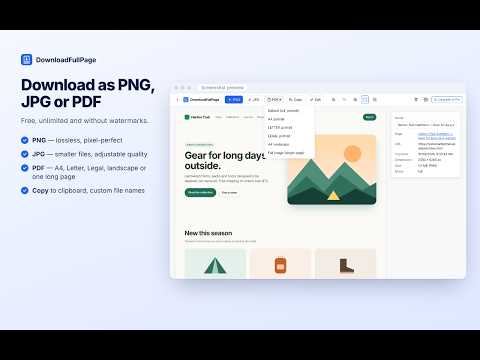
DownloadFullPage is a free full page screenshot extension for Chrome. Capture an entire webpage from top to bottom in one click, mark it up in a built-in editor, and download it as a PNG, JPG or PDF. No account, no watermarks, no ads and no capture limits. ▶ CAPTURE ENTIRE WEBPAGES Click the toolbar icon and choose Capture Full Page. DownloadFullPage scrolls the page for you, captures each section and stitches everything into one image, then opens a clean preview tab. • Full-length capture of long articles, landing pages, documentation and online stores • Fixed headers appear once at the top instead of repeating down the page • Cookie banners and chat bubbles pinned to the bottom of the screen are kept out of the middle of your screenshot • Waits for lazy-loaded images before capturing • Detects pages that scroll inside an inner panel (common in web apps) and captures the full panel • Sharp results on high-resolution (Retina / HiDPI) displays • Very tall pages are saved in parts automatically, so nothing is cut off by browser image-size limits • A progress bar with Cancel, plus Esc on the page to stop at any time; the page is always scrolled back to where you were ▶ FOUR CAPTURE MODES • Full Page – the whole page, top to bottom • Visible Area – exactly what is on your screen • Selected Region – drag a box around any area • Element – hover and click any part of a page, such as a product card, chart, table or article; use the arrow keys to select a larger or smaller element. Elements taller than the screen are captured in full Start a capture from the toolbar popup, the right-click menu, or a keyboard shortcut. ▶ BUILT-IN SCREENSHOT EDITOR Annotate before you share: • Crop, resize and rotate • Text, arrows, lines, rectangles and circles • Highlighter • Blur and pixelate to hide sensitive information • Freehand drawing • Color picker and adjustable thickness • Select, move and delete annotations • Undo, redo and reset Save your edits as a new screenshot or export them straight away. Editing is free. ▶ DOWNLOAD AS PNG, JPG OR PDF • PNG – lossless, pixel-perfect • JPG – smaller files with adjustable quality • PDF – A4, Letter or Legal, portrait or landscape, or one long page • Copy a screenshot to the clipboard • Automatic file names based on the website and date, or your own pattern using {domain}, {title}, {date} and {time} • Optional "Save As" dialog and optional automatic download after each capture • Optional URL and date/time stamp on exported images and PDFs No watermarks on any export. ▶ SCREENSHOT HISTORY AND COLLECTIONS Every capture is kept in a private history inside your browser: • Thumbnails with website, date and size • Search by name, page title or URL • Rename, delete or bulk-delete • Organize captures into collections (folders) • See how much storage your screenshots use • Optional automatic clean-up of old screenshots ▶ PRIVACY MASKING Optionally hide e-mail addresses, phone numbers and password fields on the page while it is being captured. Matching runs entirely on your computer. Pattern matching can miss unusual formats, so always review a screenshot before sharing it. ▶ SETTINGS • Default format, JPG quality and PDF paper size • Capture quality: Standard, High or Original resolution (never artificially upscaled) • Maximum page height for endless-scrolling pages • Light, dark or system theme • Keyboard shortcuts you can change at chrome://extensions/shortcuts ▶ HOW TO USE 1. Click the DownloadFullPage icon in your Chrome toolbar (pin it for quick access). 2. Choose Capture Full Page, Capture Visible Area, Capture Selected Region or Capture Element. 3. Keep the tab visible while the page is captured. 4. In the preview, download PNG, JPG or PDF, copy to the clipboard, or click Edit to annotate. Keyboard shortcuts (default): • Alt+Shift+D – capture full page • Alt+Shift+V – capture visible area • Alt+Shift+Y – open screenshot history On Mac, Alt is the Option key. ▶ WHO IT'S FOR • Designers – save complete layouts and mark up feedback • Developers and QA testers – record how a page looks and annotate bugs • Marketers and SEO specialists – keep full-page records of landing pages and search results • Students and researchers – save articles and references as PDF • Support teams – blur private details before sharing a screenshot • Anyone who needs a whole webpage in a single image ▶ PRIVACY AND SECURITY • Screenshots are created on your computer and stored only in your browser's local storage. They are never uploaded to our servers. • No account, no tracking, no analytics and no ads. • The extension only accesses a page when you start a capture on it. It does not read your browsing history. • No access to websites is requested at install. • All code is included in the extension; no remote code is loaded. ▶ GOOD TO KNOW • Chrome does not allow extensions to capture browser pages (such as chrome:// pages and the New Tab page), the Chrome Web Store, or other extensions' pages. • Pages that change while scrolling (for example endless feeds, maps or animated canvases) may not capture perfectly. Endless feeds are captured up to the maximum height you set. • Content inside embedded frames from other websites is captured as shown on screen, but cannot be scrolled separately. Everything described above is free. Add DownloadFullPage to Chrome and capture your first full-page screenshot in seconds. More at https://downloadfullpage.com/
0 out of 5No ratings
Details
- Version1.0.0
- UpdatedOctober 29, 2026
- FeaturesOffers in-app purchases
- Size216KiB
- LanguagesEnglish (United States)
- DeveloperDigital Suvidha Pvt LtdWebsite
138 S/F KH 740/496, Chirag Delhi South Delhi New Delhi, Delhi 110017 INEmail
digisuvi@gmail.com - Non-traderThis developer has not identified itself as a trader. For consumers in the European Union, please note that consumer rights do not apply to contracts between you and this developer.
Privacy

This developer declares that your data is
- Not being sold to third parties, outside of the approved use cases
- Not being used or transferred for purposes that are unrelated to the item's core functionality
- Not being used or transferred to determine creditworthiness or for lending purposes
Support
For help with questions, suggestions, or problems, please open this page on your desktop browser