Item logo image for Download Router Pro

Download Router Pro

5.0(

3 ratings

)
Item media 4 (screenshot) for Download Router Pro
Item media 5 (screenshot) for Download Router Pro
Item video thumbnail
Item media 2 (screenshot) for Download Router Pro
Item media 3 (screenshot) for Download Router Pro
Item media 4 (screenshot) for Download Router Pro
Item media 5 (screenshot) for Download Router Pro
Item video thumbnail
Item media 2 (screenshot) for Download Router Pro
Item video thumbnail
Item media 2 (screenshot) for Download Router Pro
Item media 3 (screenshot) for Download Router Pro
Item media 4 (screenshot) for Download Router Pro
Item media 5 (screenshot) for Download Router Pro

Overview

Routes downloads using Domain -> Junction -> Subfolder logic.

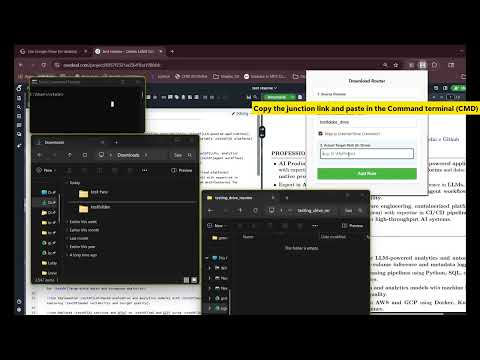
DOWNLOAD ROUTER PRO - Free Download Router Pro automatically organizes your downloads based on source domain rules. Instead of dumping everything into a single default Downloads folder, this extension routes files into specific subfolders depending on the website they came from. ┌────────────────────────────────┐ │ HOW IT WORKS │ └────────────────────────────────┘ Download Router Pro supports three routing modes: 📁 DEFAULT DOWNLOAD → SUBFOLDER Files redirect to custom subfolders inside Downloads. 💾 DEFAULT DOWNLOAD → ANOTHER DRIVE (via Junction) Files save to external drives (G:, D:, etc.) using Windows junctions. ☁️ DEFAULT DOWNLOAD → CLOUD DRIVE (via Junction) Google Drive/OneDrive when mounted as local drives. ┌──────────────────────────────┐ │ EXAMPLE │ └──────────────────────────────┘ overleaf.com → Downloads/Resume github.com → Downloads/GitHub any domain → External Drive (via junction) No manual sorting. No drag-and-drop cleanup. ┌────────────────────────────────┐ │ KEY FEATURES │ └────────────────────────────────┘ ✔ Domain-based routing ✔ Custom subfolder structure ✔ Windows junction command generator ✔ Safe fallback to normal Downloads ✔ Lightweight and fast ┌───────────────────────────────┐ │ WHO IT'S FOR │ └───────────────────────────────┘ • Job seekers organizing resume versions • Students managing project downloads • Developers separating GitHub exports • Researchers organizing PDFs by source • Power users managing multi-drive storage ━━━━━━━━━━━━━━━━━━━━━━━━━━━━━━━━━━ FAQ ━━━━━━━━━━━━━━━━━━━━━━━━━━━━━━━━━━ 1. What is a junction? A Windows junction is a link that redirects one folder location to another. It allows your Downloads folder to point to another drive without copying files. Example: Downloads/Resume → G:\MyDrive\Resume Note: Files are physically stored on G:, not on C:. ━━━━━━━━━━━━━━━━━━━━━━━━━━━━━━━━━━ 2. How do I connect Google Drive or another cloud drive? 1. Install the official desktop sync app (Google Drive, OneDrive, etc.). 2. Ensure the cloud storage appears as a local drive on your system. 3. Create a junction from your Downloads subfolder to the mounted drive location. Once mounted, routing works like any other drive. ** IMPORTANT NOTES 1. Junction setup is required for external or cloud routing. 2. Deleting the junction does NOT delete files stored on the target drive. 3. The extension does not upload, copy, or access file contents. It only redirects download paths using Chrome’s downloads API. ━━━━━━━━━━━━━━━━━━━━━━━━━━━━━━━━━━ 3. How it help-full for Job Seekers If you download resumes from Overleaf or similar platforms, this extension automatically separates each version into a specific folder — either in a local subfolder or another drive (including cloud drives if mounted). ☆☆☆☆☆☆☆☆☆☆☆☆☆☆☆☆☆☆☆☆☆☆☆☆☆☆☆☆☆☆☆☆☆☆☆☆☆☆☆☆☆☆☆☆☆☆☆☆☆☆☆☆ Version: 1.0

Details

  • Version
    1.2
  • Updated
    March 25, 2026
  • Size
    800KiB
  • Languages
    English
  • Developer
    Email
    bgiddalu@gmail.com
  • Non-trader
    This developer has not identified itself as a trader. For consumers in the European Union, please note that consumer rights do not apply to contracts between you and this developer.

Privacy

Manage extensions and learn how they're being used in your organization
The developer has disclosed that it will not collect or use your data. To learn more, see the developer’s privacy policy.

This developer declares that your data is

  • Not being sold to third parties, outside of the approved use cases
  • Not being used or transferred for purposes that are unrelated to the item's core functionality
  • Not being used or transferred to determine creditworthiness or for lending purposes

Related

Downloads Router Plus

5.0

Organize your downloads automatically! Set custom download locations based on filetype, filename, or source domain.

Downloads Router

3.9

Organize your downloads automatically! Set custom download locations based on filetype, filename, or source domain.

Cove — Download Router

5.0

Route your downloads from any website to the right folder, automatically. Keep your Downloads folder organized.

Download Router

0.0

Automatically routes downloads to specific folders based on rules.

AutoFolder

5.0

One click to organize downloads. Pick a folder for each website, and files automatically go there. No more messy Downloads folder!

Download Folder Auto

5.0

Automatically organizes downloads using filename keywords, file types (extensions), and site domains.

SmarTidy Downloader

5.0

SmarTidy Downloader: Automatically organize your downloads into the right folders. No more mess, just clarity!

Downloads in Order

5.0

Automatically organizes downloads into specific folders within the main Downloads folder.

Download Organizer

0.0

Automatically organizes downloaded files into folders based on domain and file type.

Smart Download Sorter

1.0

Automatically sorts your downloads into folders by file type. Pro users can add custom sorting rules.

Zendesk Download Router

4.7

Automatically routes Zendesk downloads into separate folders by ticket number

Download Router

4.0

Route downloads to specific folders based on priority rules (domain, file type, filename pattern).

Downloads Router Plus

5.0

Organize your downloads automatically! Set custom download locations based on filetype, filename, or source domain.

Downloads Router

3.9

Organize your downloads automatically! Set custom download locations based on filetype, filename, or source domain.

Cove — Download Router

5.0

Route your downloads from any website to the right folder, automatically. Keep your Downloads folder organized.

Download Router

0.0

Automatically routes downloads to specific folders based on rules.

AutoFolder

5.0

One click to organize downloads. Pick a folder for each website, and files automatically go there. No more messy Downloads folder!

Download Folder Auto

5.0

Automatically organizes downloads using filename keywords, file types (extensions), and site domains.

SmarTidy Downloader

5.0

SmarTidy Downloader: Automatically organize your downloads into the right folders. No more mess, just clarity!

Downloads in Order

5.0

Automatically organizes downloads into specific folders within the main Downloads folder.

Search
Clear search
Close search
Google apps
Main menu