

Download Banggood product images
1 rating
)
Overview
Easily download the main image from the Banggood product page
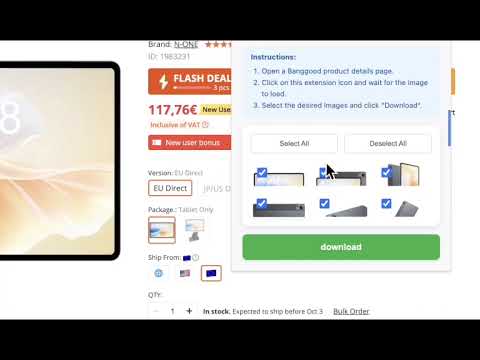
Are you still frustrated by right-clicking and saving Banggood product images one by one? Say goodbye to the hassle and embrace efficiency! Banggood Product Material Downloader is your ultimate solution. With just one click, you can easily batch download all your high-definition product images. This powerful tool is designed for cross-border e-commerce sellers, independent website owners, digital marketers, and Banggood enthusiasts to completely streamline your workflow and save you valuable time. [Core Features and Benefits] 1. One-Click Batch Download Stop wasting time on repetitive tasks. With just one click, our plugin automatically grabs all the product images on the page and prepares them for download. What used to take minutes now takes seconds. 2. Smart ZIP Packaging Say goodbye to cluttered download folders! When you select multiple images, the plugin automatically packages them into a clearly named .zip file. This not only saves space but also keeps your material management organized. 3. High-Quality Original Image Guarantee No more blurry thumbnails. Our intelligent parsing technology automatically retrieves the highest resolution original images available on our server. You'll get detailed, high-definition images perfect for your online store, marketing campaigns, or design projects. 4. Intuitive Selection, Precise Control You're in complete control. The plugin's pop-up interface clearly displays all available images for download. Use the convenient "Select All" and "Deselect All" buttons for quick access, or select only the specific images you need. Built-in pagination makes browsing through massive images effortless. [How to Use:] Open any product detail page on Banggood (including .de, .co.jp, and other sites). Click the plugin icon in your browser toolbar. Wait a moment for the plugin to automatically parse all images on the page. Select the images you want to download. Click the "Download" button. It's that simple!
5 out of 51 rating
Details
- Version1.2
- UpdatedSeptember 29, 2025
- Offered by8123283
- Size142KiB
- Languages54 languages
- Developer
Email
8123283@gmail.com - Non-traderThis developer has not identified itself as a trader. For consumers in the European Union, please note that consumer rights do not apply to contracts between you and this developer.
Privacy

This developer declares that your data is
- Not being sold to third parties, outside of the approved use cases
- Not being used or transferred for purposes that are unrelated to the item's core functionality
- Not being used or transferred to determine creditworthiness or for lending purposes
Support
For help with questions, suggestions, or problems, please open this page on your desktop browser