


總覽
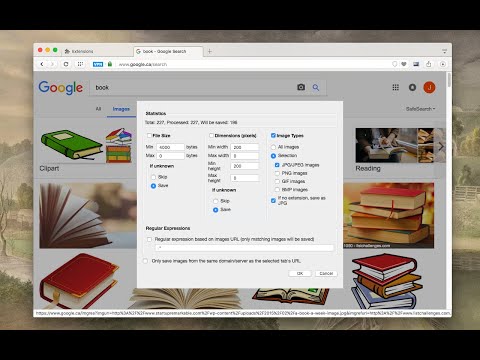
輕鬆儲存圖片,提供多種自訂功能,如檔案大小、尺寸和圖片類型。
This is a bulk image downloader to extract all photos from the current web page. This online image downloader provides highly customizable filters based on file size, image size, and more! Usage Preview: https://www.youtube.com/watch?v=YaT5sWRV6JQ Features: 1. Detects all images loaded on the current web page (even if they're nested iframes) 2. Filters images by file size, dimension, URL or type 3. Finds images in links, background scripts, and CSS files 4. Displays images in a gallery view before downloading 5. Download blob-type images even if the source is dead Filters: 1. Filter by file size 2. Filter by image dimension 3. Filter by image type 4. Filter by image URL (regular expression matching) 5. Filter by same-origin policy 6. Detect image width and height by downloading only the header section of the image Features: 1. Bulk download images 2. Filter based on file properties 3. Filter based on image properties such as width and height 4. Deep image search (extract images from the current page and subsequent pages) 6. Can detect single image path 7. Can download photos in ZIP format 8. Can detect the original image size from thumbnail Bug reports: https://github.com/belaviyo/save-images/issues Download location: By pressing the "Save" button, the extension downloads all selected images in the default download directory or a specified subfolder. Change Log: Version 0.1.1 1. The extension now stores images in a sub-folder (the default sub-folder name is the domain's name) 2. One security bug is fixed. Version 0.2.0 1. Images are now saved in a zip archive to prevent multiple downloads and better file-naming 2. The image detection algorithm is improved. Version 0.2.1 1. User preferences are now persistent. It is still possible to reset them from the UI 2. It is now possible to ask for "Save Dialog" from the UI 3. There is progress indicating how many images proceed 4. UI closes itself when all images are downloaded. Version 0.2.2 1. Deep image searching through all links (up to two levels) 2. Updates JSZip library Version 0.3.4 1. You can now open "Gallery View" in a new browser tab 2. You can now click on a single image in the "Gallery View" 3. It is possible to download images from multiple tabs at once Version 0.3.7 1. Two new filters: remove identical images and remove images with forbidden keywords 2. It is now possible to stop the image spider from the UI without closing it Version 0.5.6 1. Deeps search level 3 (search for both links and images in the destination HTML pages) 2. Custom RegExp filters to increase the searching speed. Version 0.9.0 1. Moves to manifest v3 2. Internal module to detect image width and height only by downloading the header section 3. Detects images first, then detects other mime types 4. The extraction of hard-coded image links is improved
4.3 分 (滿分 5 分)282 個評分
詳細資料
- 版本1.0.9
- 已更新2026年2月17日
- 提供者MeryDev
- 大小154KiB
- 語言3 種語言
- 開發人員
電子郵件
schomery.developer@gmail.com - 非交易商這位開發人員並未表明自己是交易商。歐盟地區的消費者請注意,消費者權利不適用於你和這位開發人員之間簽訂的合約。
隱私權

這位開發者就你的資料做出下列聲明:
- 除經核准的用途外,不會將你的資料販售給第三方
- 不會基於與商品核心功能無關的目的,使用或轉移資料
- 不會為了確認信用度或基於貸款目的,使用或轉移資料
支援
如有疑問或建議,請前往開發人員的支援網站