

Dot AI
5 ratings
)
Overview
Analyze lecture transcripts from Panopto
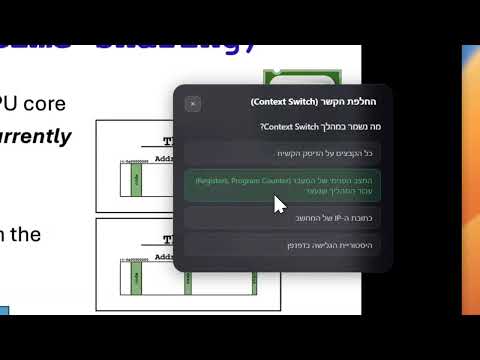
Dot AI watches your Panopto lecture alongside you and identifies concepts that students commonly struggle with. When it spots a tricky topic, it shows a brief explanation bubble right on the video — no need to pause, switch tabs, or Google anything. **How it works:** - Click "Analyze Lecture" while watching a recorded lecture on Panopto - Dot AI reads the transcript and uses AI to identify 8–15 key concepts - Explanation bubbles appear on the video, synced to the timeline - Click a bubble to expand it and see a full explanation with examples - Dismiss bubbles you already understand with "Got it" **Features:** - Timeline markers showing where each concept appears in the lecture - Difficulty indicators (basic, core, advanced) - Active recall quiz prompts — test yourself after dismissing a concept - Lecture history bubble — review all past insights at a glance - Drag-and-drop bubble positioning - Works in English and Hebrew - In-page settings panel — change language, theme, and re-analyze without leaving the video - Lecture-aware slide explanations — AI uses the lecture title for more relevant context - LaTeX math rendering in explanations - Light and dark theme support - Works on all universities using Panopto (panopto.eu and panopto.com) - Results are cached — re-opening a lecture loads insights instantly
5 out of 55 ratings
Details
- Version1.4.5
- UpdatedJuly 26, 2026
- Offered bytomer.shulman7
- Size42.84KiB
- LanguagesEnglish
- Developer
Email
tomer.shulman7@gmail.com - Non-traderThis developer has not identified itself as a trader. For consumers in the European Union, please note that consumer rights do not apply to contracts between you and this developer.
Privacy

Dot AI has disclosed the following information regarding the collection and usage of your data. More detailed information can be found in the developer's privacy policy.
Dot AI handles the following:
This developer declares that your data is
- Not being sold to third parties, outside of the approved use cases
- Not being used or transferred for purposes that are unrelated to the item's core functionality
- Not being used or transferred to determine creditworthiness or for lending purposes